
How to Install Claude Code on Mac, Windows and Linux
Install Claude Code with one command on Mac, Windows or Linux, sign in, and fix the errors that stop most installs, from PATH to 403s and npm permissions.
To install Claude Code, open a terminal and paste one line. On a Mac, Linux or WSL, run curl -fsSL https://claude.ai/install.sh | bash. On Windows PowerShell, run irm https://claude.ai/install.ps1 | iex. Then open a new terminal and type claude --version to check it worked.
That is the whole install when it goes right. When it goes wrong, the error is usually one of six. We have set Claude Code up on Mac and Windows machines, and we have hit most of them. This guide covers the install for every system, the sign in, and a fix for each common error.
The quick path follows.
- Use the native installer. It is the one Anthropic recommends, and it updates itself.
- You need a paid plan or an API account. The free Claude plan does not include Claude Code.
- Open a new terminal after you install. The old window does not know where
claudelives. - "Command not found" almost always means PATH. The fix is one or two lines.
- Never use sudo with npm. Anthropic's docs warn against it.
Inside This Post
8 sections
Before You Install
Check three things first. They cause more failed installs than any bug.
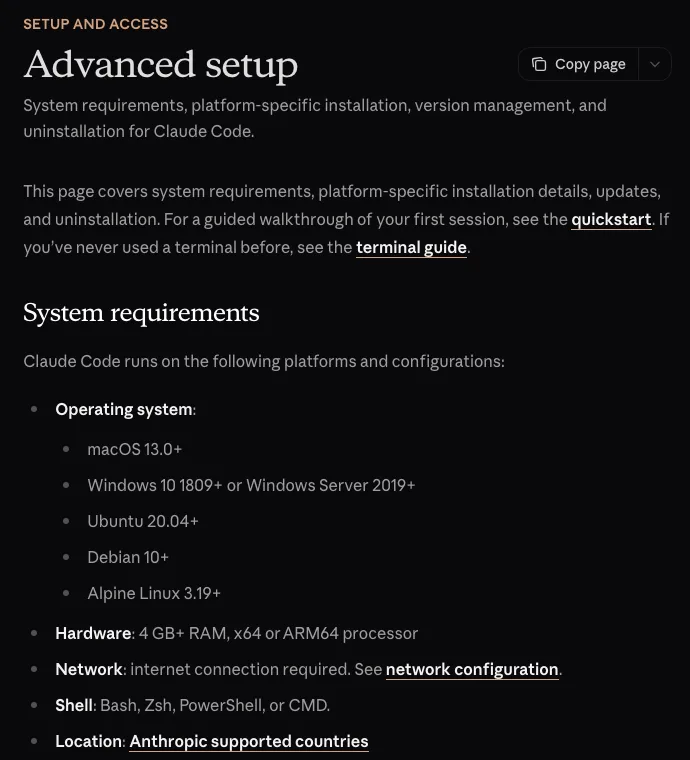
Your system. Per Anthropic's setup docs, Claude Code needs macOS 13 or newer, Windows 10 version 1809 or newer, Ubuntu 20.04 or newer, Debian 10 or newer, or Alpine 3.19 or newer. It needs at least 4 GB of RAM and an x64 or ARM64 processor.
Your account. You need Claude Pro, Max, Team, Enterprise or a Claude Console account. The free plan does not include Claude Code. Pro starts at $20 a month. We break down every plan in Claude Code pricing.
Your country. Claude Code only works in Anthropic's supported countries. If the install prints "App unavailable in region," that is why.
Install Claude Code in One Command
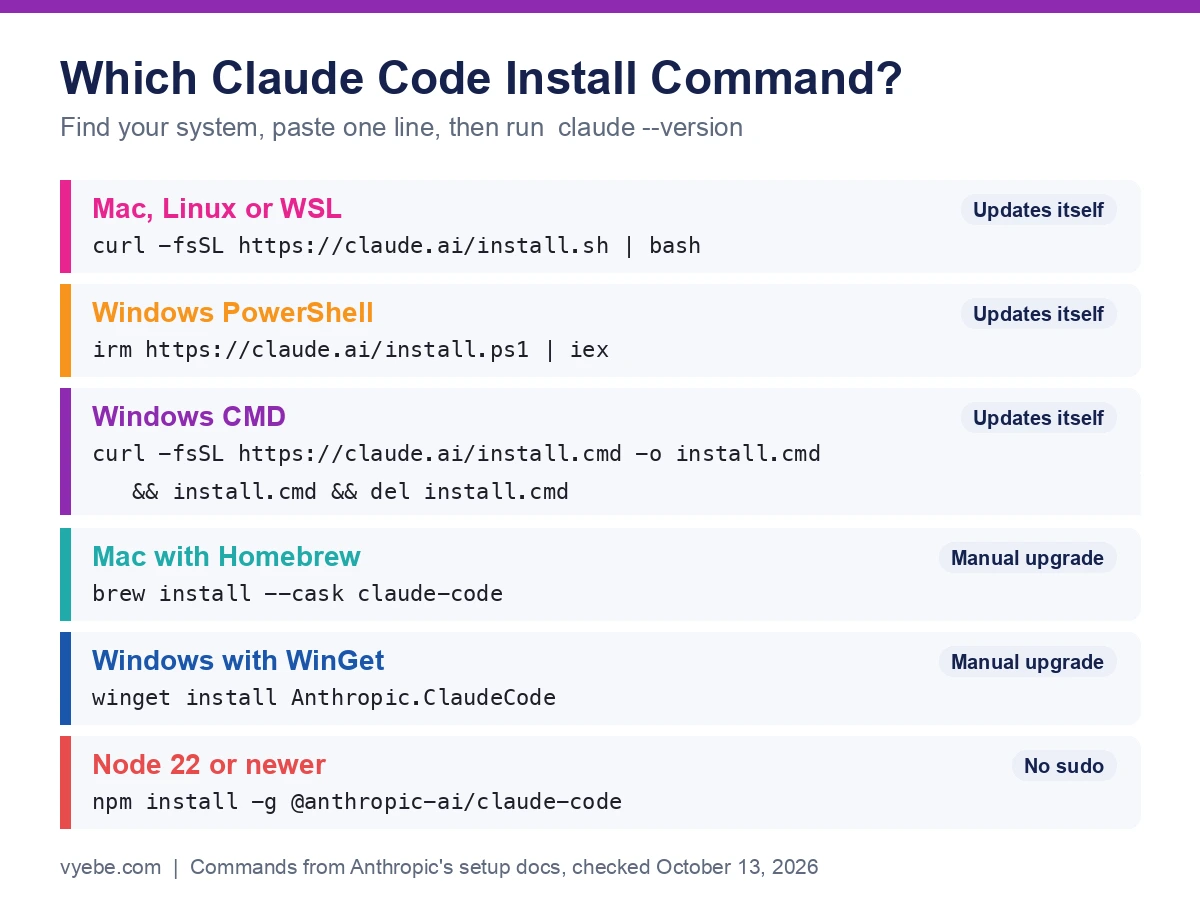
Find your system below and paste the command. Every command here comes from Anthropic's setup docs.
Mac, Linux and WSL
Open Terminal and run this.
curl -fsSL https://claude.ai/install.sh | bashThe installer shows no progress bar while it downloads. Give it a minute. When it ends, close the window and open a new one.
Windows PowerShell
Open PowerShell. Your prompt starts with PS C:\ when you are in the right place. You do not need to run it as Administrator.
irm https://claude.ai/install.ps1 | iexWindows Command Prompt
If your prompt shows C:\ with no PS, you are in CMD. Use this instead.
curl -fsSL https://claude.ai/install.cmd -o install.cmd && install.cmd && del install.cmdMixing these up is the most common Windows mistake. If you see The token '&&' is not a valid statement separator, you ran the CMD line in PowerShell. If you see 'irm' is not recognized, you ran the PowerShell line in CMD.
Homebrew and WinGet
You can use a package manager instead. On a Mac, run brew install --cask claude-code. On Windows, run winget install Anthropic.ClaudeCode.
The catch is updates. The docs say Homebrew and WinGet installs do not update themselves. You have to run brew upgrade claude-code or winget upgrade Anthropic.ClaudeCode yourself. The Homebrew claude-code cask also follows the stable channel, which runs about a week behind.
On October 13, 2026, we checked both. The npm latest tag was version 2.1.299. The stable tag and the Homebrew cask were both on 2.1.287, per the npm registry and Homebrew's cask page.
Linux Package Managers
Debian, Ubuntu, Fedora, RHEL and Alpine users can install from Anthropic's signed apt, dnf or apk repositories. The steps add a signing key first, so follow the Linux section of the setup docs line by line. These installs update with your normal system upgrades.
npm
You can still install with npm. It needs Node.js 22 or newer.
npm install -g @anthropic-ai/claude-codeDo not put sudo in front of it. The docs warn that it leads to permission problems and security risks. To upgrade later, run npm install -g @anthropic-ai/claude-code@latest. The docs say to avoid npm update -g, which may not move you to the newest release.
Check It Worked and Sign In
Open a new terminal window and run this.
claude --versionYou should see a version number followed by (Claude Code). For a deeper check, run claude doctor. It reports install health and settings errors without starting a session.
Now go to a project folder and start it.
cd your-project-folder
claude
On first run, Claude Code opens your browser to log in. Pick your Claude plan or your Console account. Per the quickstart, your login is saved, so you only do this once. Type /login later to switch accounts.
One warning here. If your computer has an ANTHROPIC_API_KEY set, Claude Code will offer to use it. Say yes and your work bills the API, not your plan. If you meant to use your subscription, say no.
Fix the Errors That Stop Most Installs
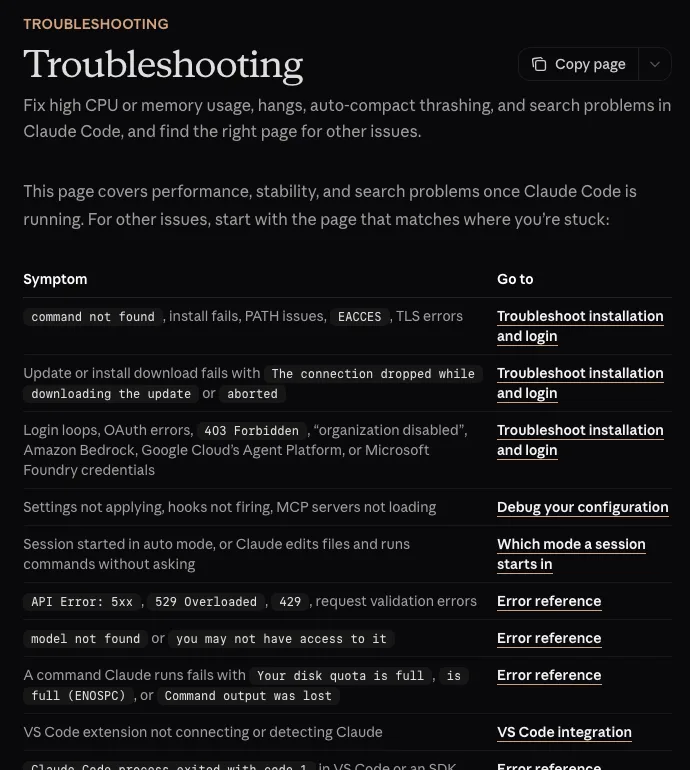
Anthropic keeps a long install troubleshooting page. These are the errors we see most, with the fix for each.
| What you see | What it means | The fix |
|---|---|---|
command not found: claude or 'claude' is not recognized | The install folder is not on your PATH | Add it, below, then open a new terminal |
syntax error near unexpected token '<' | The installer got a web page, not a script | Wait a few minutes and retry, or use Homebrew or WinGet |
curl: (22) ... error: 403 | Blocked by region, proxy or firewall | Check you are in a supported country, then check your network |
The token '&&' is not a valid statement separator | CMD command in PowerShell | Use the PowerShell line |
running scripts is disabled on this system | PowerShell blocks npm's script files | Use the PowerShell installer instead of npm |
EACCES: permission denied | npm cannot write its global folder | Switch to the native installer |
Killed during install on Linux | The server ran out of memory | Free memory or add swap, then rerun |
Error: claude native binary not installed | npm skipped a step | Reinstall without --ignore-scripts or --omit=optional |
Fix Your PATH on a Mac or Linux
The installer puts claude in ~/.local/bin. If that folder is not on your PATH, your shell cannot find it. On a Mac with the default Zsh shell, run these two lines.
echo 'export PATH="$HOME/.local/bin:$PATH"' >> ~/.zshrc
source ~/.zshrc
On Linux with Bash, use ~/.bashrc in both lines instead. Bash on a Mac reads ~/.bash_profile. The docs list each case.
Fix Your PATH on Windows
On Windows the program lives at %USERPROFILE%\.local\bin\claude.exe. In PowerShell, run these two lines, then close and reopen your terminal.
$currentPath = [Environment]::GetEnvironmentVariable('PATH', 'User')
[Environment]::SetEnvironmentVariable('PATH', "$currentPath;$env:USERPROFILE\.local\bin", 'User')
If you run claude inside VS Code's terminal, quit and reopen VS Code too. A terminal inside an editor takes its PATH from the editor.
Two Windows Quirks
Git for Windows is optional. Without it, Claude Code runs commands through PowerShell. With it, Claude Code can use Git Bash. The docs recommend it on native Windows.
An old Claude Desktop can steal the name. Older versions of the Desktop app register their own Claude.exe, so typing claude opens the app. Updating Claude Desktop fixes it.
Should You Use Native, Homebrew or npm?
Use the native installer unless you have a reason not to. The reasons come from our own machines.
The Mac we wrote this on runs Claude Code through an old npm install under Node 22. On October 13, 2026, it reported version 2.1.289 while npm's latest tag read 2.1.299. Nothing broke. But it was not on the newest release, and it never told us. A native install updates in the background and would have caught up on its own.
| Method | Updates itself | Best for |
|---|---|---|
| Native installer | Yes | Almost everyone |
| Homebrew | No, unless you turn it on | Mac users who manage everything with brew |
| WinGet | No, unless you turn it on | Windows users who manage everything with WinGet |
| apt, dnf or apk | Through system upgrades | Linux servers and locked down machines |
| npm | Only if npm's global folder is writable | People who already live in Node |
If you want package manager installs to update for you, the docs say to set CLAUDE_CODE_PACKAGE_MANAGER_AUTO_UPDATE to 1.
Don't Want a Terminal at All
You have options. The Claude Code Desktop app runs on macOS, Windows and Linux with no command line. There is also a VS Code extension and a JetBrains plugin, plus Claude Code on the web.
One catch with VS Code. Per the troubleshooting docs, the extension bundles its own private copy of Claude Code. It does not add claude to your PATH. If you want to use it in a terminal too, run the normal install as well.
New to all this? Read choosing your first AI coding tool first. Once you are in, our vibe coding best practices cover the habits that keep a project healthy.
How to Update or Uninstall Claude Code
To update a native install right now, run claude update. To choose a slower, safer channel, set autoUpdatesChannel to stable in /config.
To uninstall a native install on a Mac, Linux or WSL, run these two lines.
rm -f ~/.local/bin/claude
rm -rf ~/.local/share/claude
For Homebrew run brew uninstall --cask claude-code. For WinGet run winget uninstall Anthropic.ClaudeCode. For npm run npm uninstall -g @anthropic-ai/claude-code.
Your settings and history live in ~/.claude and ~/.claude.json. Only delete them if you want a clean slate. They hold your settings, allowed tools, MCP servers and session history.
Still Wondering?
- How do I install Claude Code?
Open a terminal and run the native installer. On Mac, Linux or WSL, use
curl -fsSL https://claude.ai/install.sh | bash. On Windows PowerShell, useirm https://claude.ai/install.ps1 | iex. Then open a new terminal, runclaudeand log in.- Can you install Claude Code for free?
The install is free, but using it is not. Claude Code needs a Pro, Max, Team, Enterprise or Console account. The free Claude plan does not include it. Pro is the cheapest plan at $20 a month.
- How do I install Claude Code on Windows?
Run
irm https://claude.ai/install.ps1 | iexin PowerShell. You do not need Administrator rights. Ifclaudeis not found afterward, add%USERPROFILE%\.local\binto your PATH and open a new terminal.- Do I need Node.js to install Claude Code?
No. The native installer, Homebrew and WinGet do not need Node.js. Only the npm route does, and it needs Node.js 22 or newer.
- Why does it say command not found after I installed Claude Code?
The folder Claude Code was installed to is not on your PATH, or your terminal was open before the install. Open a new window first. If that fails, add
~/.local/binto your PATH as shown above.- How do I reinstall Claude Code?
Uninstall it with the command for your install method, then run the native installer again. If
claudestill runs after uninstalling, you have a second install somewhere. Runwhich -a claudeon a Mac or Linux to find it.- How do I set up Claude Code in VS Code?
Press Cmd+Shift+X on a Mac or Ctrl+Shift+X on Windows to open the Extensions view, search for Claude Code, and click Install. It works on its own. To also use
claudein a terminal, run the normal install, since the extension does not add it to your PATH.
Like this guide? Add Vyebe as a preferred source on Google and see more of our posts when you search.
The Paper Trail
- Claude Code docs, Advanced setup, system needs, every install method, updates and uninstall, accessed October 2026
- Claude Code docs, Quickstart, first session and login, accessed October 2026
- Claude Code docs, Troubleshoot installation and login, error messages and fixes, accessed October 2026
- npm, @anthropic-ai/claude-code, version tags and Node.js requirement, accessed October 2026
- Homebrew, claude-code cask, cask version, accessed October 2026
- Anthropic, Plans and pricing, which plans include Claude Code, accessed October 2026
- Steve Kinney, Installing and setting up Claude Code, June 24, 2026, the ranking guide we compared against, accessed October 2026
Stalled somewhere in here?
Send us the project and what's blocking you. You'll get a straight read on what's actually wrong, including if it's something you can fix yourself.
Tell us what happenedWorth Reading
Claude Code Pricing Explained for Pro, Max and the API
Claude Code costs $20 a month on Pro, $100 or $200 on Max, or pay per token on the API. Current prices, limits, a worked cost example and how to pick.
FundamentalsIs Vibe Coding Bad? What the Evidence Says
Vibe coding is not bad for prototypes and personal tools. It is bad when unread AI code holds other people's data. The studies and breaches show why.