
Steer Claude Code From Your Phone With Remote Control
Claude Code Remote Control lets your phone drive a session running on your own computer. Setup, server mode, push alerts, safety and the errors that block it.
The costly mistake with Remote Control is starting a long build, closing the laptop and heading out, sure your phone will carry it. It won't. Remote Control is a window into the Claude Code session on your own computer, so the computer has to stay on and the claude process has to keep running. Keep the machine awake, or send the job to a cloud session instead.
We run Claude Code all day on the machine that builds this site, and the help text and flags below come from that install. Every figure below links to where it came from.
Inside This Post
9 sections
What Remote Control Does
Anthropic's Remote Control docs describe it as a link between a Claude Code session on your computer and either claude.ai/code or the Claude app for iPhone and Android. You start a task at your desk and keep steering it from the couch, a car line or another computer.
Claude keeps running locally the whole time. That means you get your full setup from the phone. Your files, your MCP servers, your project settings and @ file search all work. You can also send a photo from your phone, and Claude sees it as part of your message.
The conversation stays in sync everywhere. You can type in the terminal, then on your phone, then in a browser, and it is all one session. If your laptop sleeps or the Wi-Fi drops, Claude Code reconnects when the machine comes back.
There is no separate Claude Code app. The mobile docs say Remote Control sessions live in the Code tab of the regular Claude app.
Set It Up in Four Steps
Step 1. Check your plan and login. The docs list Pro, Max, Team and Enterprise. On Team and Enterprise, an owner has to switch on the Remote Control toggle in the Claude Code admin settings first. Sign in with /login through claude.ai. If an ANTHROPIC_API_KEY is set in your shell, Claude Code uses it instead, and Remote Control refuses to start.
Step 2. Start a session. Pick the form that fits how you work.
| Where you are | What to type | What you get |
|---|---|---|
| A fresh terminal | claude remote-control | Server mode. Waits for your phone, can run many sessions |
| A fresh terminal, want to type too | claude --remote-control "My Project" | A normal session you can also drive remotely |
| Already in a session | /remote-control or /rc | Carries your current chat over to the phone |
| VS Code or the desktop app | /remote-control in the prompt box | Same thing, no QR code |
The first time, Claude Code asks you to confirm before it connects. In a folder you haven't trusted yet, it also asks whether to trust that folder.
Step 3. Connect your phone. In server mode, press the spacebar to show a QR code and scan it. Or open the Claude app, tap Code and pick the session. Online sessions show a computer icon with a green dot. If you don't have the app, run /mobile and scan the code it shows.
Step 4. Turn on alerts. Install the app, sign in with the same account, allow notifications, then run /config in your terminal. Turn on Push when Claude decides for finished tasks, and Push when actions required for permission prompts and questions. You can also just ask, like "notify me when the tests finish."
Run Several Sessions From One Phone
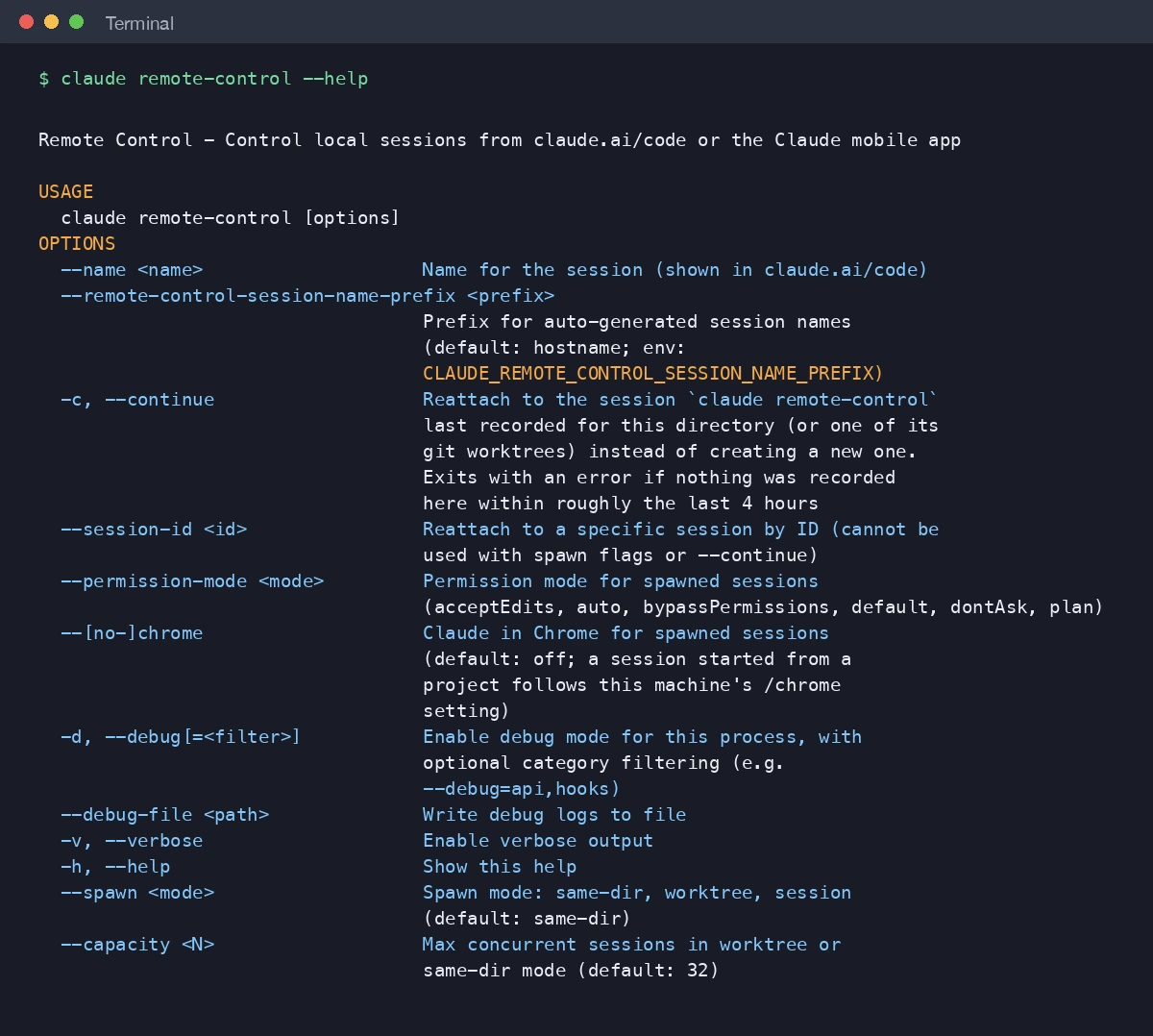
Server mode is the part most guides skip. One claude remote-control process can serve many sessions, so your phone can start a new one whenever you like.
Pick how they share the folder. The --spawn flag sets it. same-dir is the default, and every session works in the same folder, so two of them can step on the same file. worktree gives each new session its own git worktree, a separate copy of the repo on its own branch. That is the safer pick for parallel work. session serves exactly one session and turns away the rest. Press w while the server runs to flip between the first two, and Claude Code remembers your pick for that project.
Set the ceiling. --capacity caps how many sessions can run at once. The default is 32.
Set the starting permission mode. --permission-mode acceptEdits or --permission-mode plan sets how every new session starts.
Bring it back after a stop. If you stop the server with Ctrl+C, the docs say you have about four hours to bring the sessions back. Run claude remote-control again in the same folder for all of them, or claude remote-control --continue for just the first one.
The Clocks Inside Remote Control
Remote Control has more timers than most people expect. Knowing them explains most of the "it just stopped" reports.
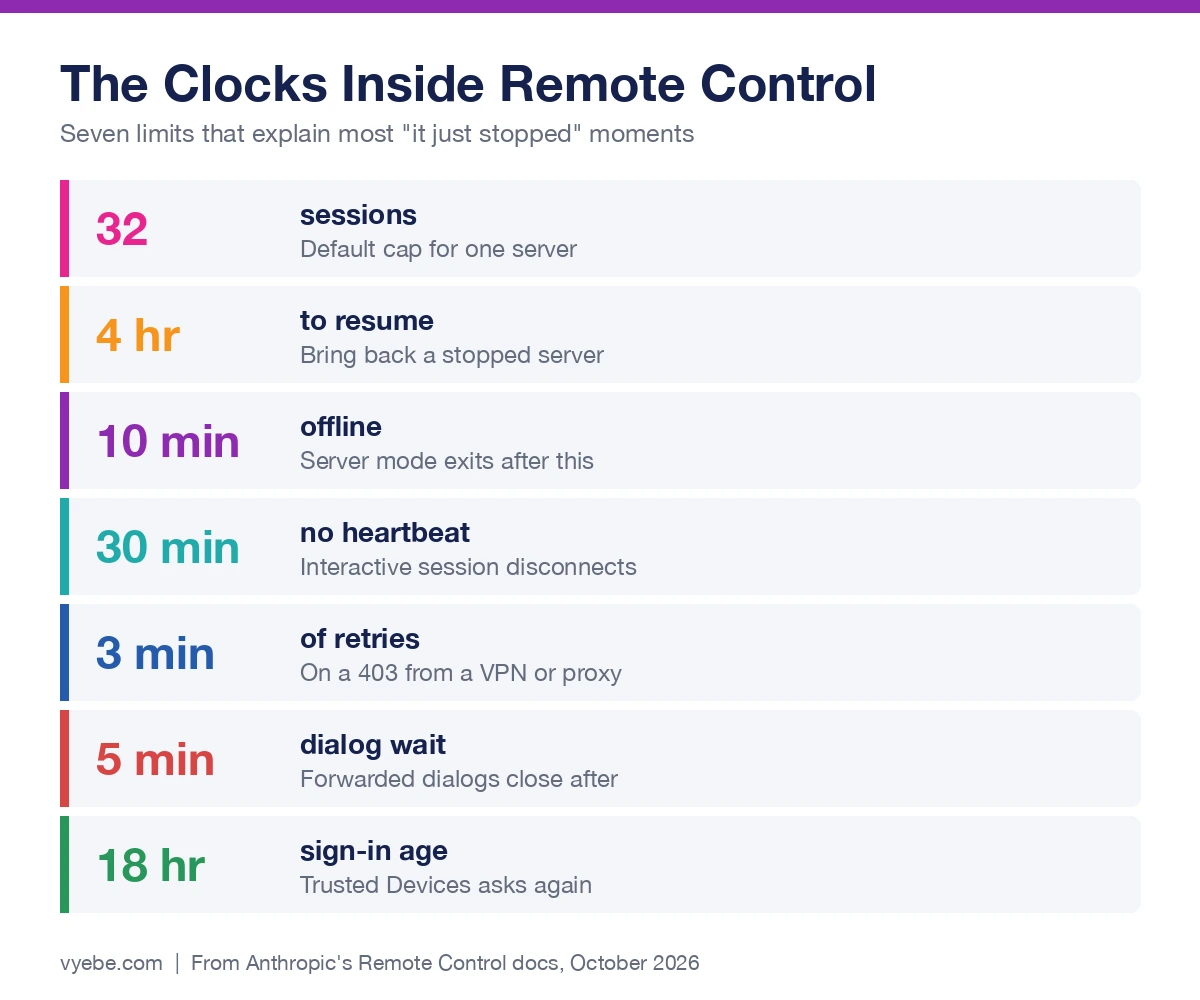
A network outage hits the two modes differently. The limitations list says server mode gives up after roughly 10 minutes without a network and the process exits. An interactive session keeps retrying for as long as the outage lasts.
Permission prompts wait for you. Questions and permission prompts stay open until you answer. Other dialogs forwarded to your phone close after five minutes and take their no-action default.
Closing the terminal ends it. If you run Claude Code on a remote server over SSH, start it inside tmux or screen so it survives when you disconnect.
Remote Control vs Dispatch vs Cloud Sessions
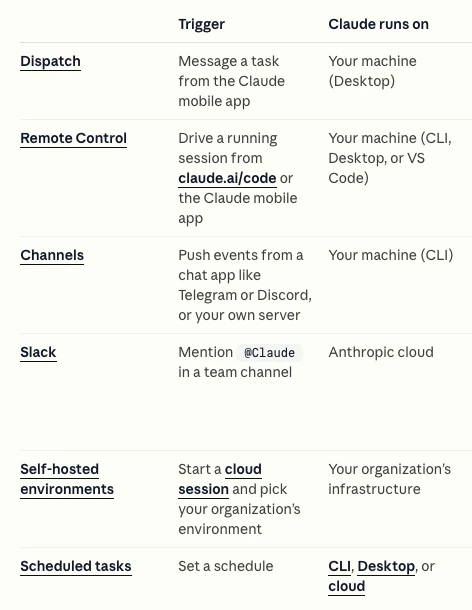
Anthropic offers several ways to work away from the keyboard, and they get mixed up. The deciding question is where the work runs.
| Option | Where Claude runs | Your computer must be on? | Best for |
|---|---|---|---|
| Remote Control | Your machine | Yes | Steering work you already started |
| Dispatch | Your machine, through the desktop app | Yes | Texting a task from your phone |
| Cloud session | Anthropic's servers | No | Jobs on a GitHub repo that run while you're away |
| Channels | Your machine | Yes | Reacting to Telegram, Discord or CI alerts |
That table follows the comparison in the Remote Control docs. Dispatch has a catch. Claude's help center says it is in limited beta on some Pro and Max plans and isn't open to new users. If you can't see it, Remote Control is the dependable path for local work.
Is Remote Control Safe?
The design is careful, with two trade-offs you should know.
No open ports. The docs say your machine only makes outbound HTTPS requests and never opens inbound ports. Traffic runs through Anthropic's API over TLS, with short-lived credentials that each do one job.
The transcript is stored. While you're connected, your messages, Claude's replies and tool activity are kept on Anthropic's servers so every device stays in sync. Organizations with Zero Data Retention or the HIPAA setup can't turn Remote Control on at all, according to the same docs and the legal and compliance page.
Your phone becomes a key. Anyone holding your unlocked phone can steer a session that edits your files. Trusted Devices, a beta setting, closes that gap. Each phone or browser has to enroll, and a sign-in older than 18 hours needs a Face ID, Touch ID or passkey check. Pro and Max users turn on Require trusted devices themselves.
Bypass stays off the phone. The mobile docs say you can't select Bypass permissions from the app. That matches what Simon Willison found in February 2026, when skip permissions had no effect on a remote session. Auto mode is the closest thing, and it still runs a safety check on each action.
When It Won't Start
Most failures are a login or a setting, not a bug. The troubleshooting section covers these.
"Remote Control requires a claude.ai subscription." You're signed out, or an API key is taking over. Remove ANTHROPIC_API_KEY, ANTHROPIC_AUTH_TOKEN or an apiKeyHelper setting, then run claude auth login.
"Requires a full-scope login token." You signed in with claude setup-token. That token can only make model calls. Log in again with claude auth login.
"Only available when using Claude via api.anthropic.com." You're on Bedrock, Google Cloud, Microsoft Foundry or a custom ANTHROPIC_BASE_URL. That includes routing Claude Code through another provider, like the setup in our OpenCode vs Claude Code comparison.
"Requires feature-flag evaluation." You set CLAUDE_CODE_DISABLE_NONESSENTIAL_TRAFFIC or DISABLE_GROWTHBOOK. Unset it.
"Disabled by your organization's policy." On a personal plan, you may still be signed in under an old work organization. Run /status to check, then log out and back in.
When none of those fit, claude doctor names the check that failed. If your project got tangled while you steered it from a phone, our project rescue page is where we pick those up.
Bad Advice We Keep Seeing
"Team and Enterprise plans can't use it." Early guides say so, including the most linked one. The current docs list Team and Enterprise, once an owner turns it on.
"One session per machine." Early testers hit that limit. Server mode now runs up to 32 by default, each in its own worktree if you ask.
"Add the --sandbox flag." It was removed in version 2.1.300, and passing it now stops the server with an error. Turn on sandboxing in a settings file instead.
"Pair it with skip permissions so you never get pinged." The app won't offer Bypass. Use Auto mode, and let the push alerts bring you the few questions that need a person.
Still Wondering?
- Is Claude Code Remote Control free?
It comes with Claude Pro, Max, Team and Enterprise at no extra charge. It doesn't work on the free plan or with an API key. Pro starts at $20 a month on Claude's pricing page.
- Does my computer need to stay on?
Yes. Claude runs on your computer, and your phone is a remote screen. If the machine sleeps, the session reconnects when it wakes. If you close the terminal or quit the app, it goes offline.
- Can I use Claude Code on my phone without a computer?
Yes, with a cloud session instead. Open the Code tab in the Claude app and start a session on a GitHub repo. It runs on Anthropic's servers and keeps going with your laptop closed. Our first-day walkthrough covers the other ways in.
- How do I turn on Remote Control for every session?
Run
/configand set Enable Remote Control for all sessions to true. In the desktop app it is under Settings, then Claude Code, then Connect new sessions to Remote Control.- What is the difference between Remote Control and Dispatch?
Remote Control steers a session you already started. Dispatch lets you text a new task from your phone, and the desktop app decides how to run it. Both run on your own computer. Dispatch is a limited beta on some Pro and Max plans.
- Which commands work from the phone?
Text commands like
/compact,/clear,/contextand/usagework, and so do/modeland/effortwith a value. Terminal-only commands like/pluginand/resumedon't.
Like this guide? Add Vyebe as a preferred source on Google and see more of our posts when you search.
The Paper Trail
- Claude Code docs, Remote Control, requirements, modes, server flags, limits, security and troubleshooting, accessed October 2026
- Claude Code docs, Claude Code on mobile, the Code tab, attachments and app permission modes, accessed October 2026
- Claude Code docs, Legal and compliance, HIPAA coverage of Remote Control, accessed October 2026
- Claude Help Center, Assign tasks from anywhere in Claude Cowork, Dispatch plans and requirements, accessed October 2026
- Anthropic, Plans and pricing, Pro and Max prices, accessed October 2026
- Simon Willison, Claude Code Remote Control, February 25, 2026, launch week notes, accessed October 2026
- Claude Fast, Claude Code Remote Control setup guide, the most linked guide we measured against, accessed October 2026
Stalled somewhere in here?
Send us the project and what's blocking you. You'll get a straight read on what's actually wrong, including if it's something you can fix yourself.
Tell us what happenedWorth Reading
OpenCode vs Claude Code, and What the Free Agent Costs
OpenCode is free and open source, Claude Code is $20 a month and up. Compare models, real costs, safety defaults and the Claude login rule before you switch.
Getting StartedHow to Use Claude Code in 9 Steps, Even If You Can't Code
How to use Claude Code from the first prompt. Pick a door, start in plan mode, give it a check to run, save with git, and the keys that keep a session on track.