
How to Use Claude Code in 9 Steps, Even If You Can't Code
How to use Claude Code from the first prompt. Pick a door, start in plan mode, give it a check to run, save with git, and the keys that keep a session on track.
The costly first move with Claude Code is typing your whole app idea into one message and letting it run with every prompt switched off. It will build something. It usually won't be what you meant, and you won't know which change to blame. Start smaller. Open one folder, ask questions before you ask for code, build one piece at a time, and give Claude a way to check its own work.
We run Claude Code every day on the machine that builds this site, often several sessions at once. Most of what follows we learned by breaking something first. Every figure below links to where it came from.
Inside This Post
12 sections
Step 1. Pick the Door You Will Use
Claude Code is one agent with several front doors. Anthropic's quickstart lists the terminal, a desktop app, VS Code and JetBrains, the web, Slack, and CI tools like GitHub Actions. They share the same brain. The difference is how much you see.
| Door | Best for | What you see |
|---|---|---|
| Terminal | Speed, scripts, people who like typing | Text only. You can't click |
| Desktop app | First timers and non-coders | Buttons, a diff view, a browser preview |
| VS Code or JetBrains | People who already use an editor | Your files beside the chat |
| Web at claude.ai/code | Long jobs that run while your laptop is off | Sessions on Anthropic's machines |
If you have never opened a terminal, start with the desktop app. Anthropic's desktop docs say you sign in, click the Code tab, and press + New to start a session. Under the prompt box you pick where Claude runs (Local, SSH or Cloud), the project folder, a permission mode and a model.
If you want the terminal, our install guide covers the one line command for each system and the errors that stop most installs.
Step 2. Give Claude One Folder
Claude works inside the folder you start it in. That folder is its whole world. So give it a small, clean one.
For a brand new project, make an empty folder and move into it.
mkdir my-first-app
cd my-first-app
For an existing project, cd into that project's folder. Never start Claude in your home folder or your Desktop. It can then wander through files that have nothing to do with the job.
Step 3. Start It and Sign In
In the terminal, type claude and press Enter. The quickstart says the first run asks you to log in through your browser. You can sign in with Claude Pro, Max, Team or Enterprise, or a Claude Console account that uses prepaid API credit.
As of October 2026, Claude's pricing page lists Pro at $20 a month, or $17 a month billed yearly. Max starts at $100 a month. The Free plan does not list Claude Code. Our pricing breakdown walks through which plan fits which kind of use.
A few controls to know from minute one, per Anthropic's terminal guide. You type and press Enter. Arrow keys move through choices. Esc stops Claude mid-step. /help lists commands. exit or Ctrl+D twice leaves.
Step 4. Ask Questions Before You Ask for Code
The first prompt should not be "build me an app." It should be a question. In an existing project, try "what does this project do?" or "explain the folder structure." Claude reads the files it needs. You don't have to paste anything in.
For a new project, ask about the plan instead. Something like "I want a page where my customers can see my prices and book a time. What would I need?"
Then switch to plan mode. Press Shift+Tab until the status bar says plan mode is on, or start with claude --permission-mode plan. Anthropic's best practices page describes four phases. Explore, plan, implement, then commit. In plan mode Claude reads and proposes but cannot edit your files until you approve the plan. Press Ctrl+G to open the plan in your text editor and fix it yourself.
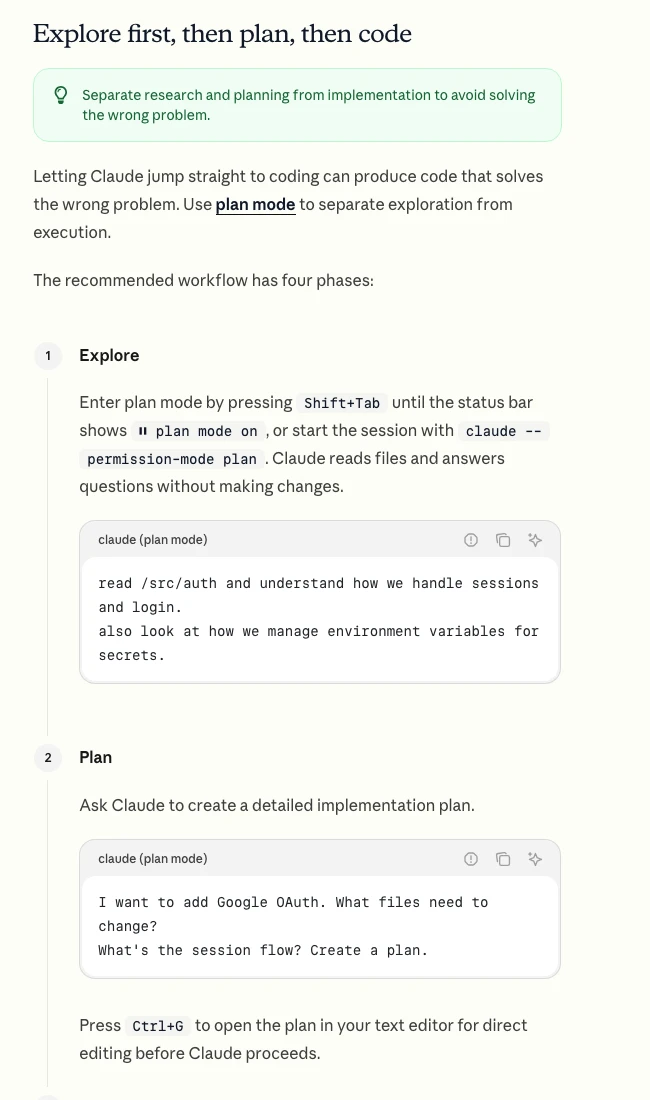
Skip the plan for tiny jobs. The same page says that if you could describe the change in one sentence, just ask for it.
Step 5. Let Claude Interview You
For anything bigger than a page, flip the roles. Tell Claude what you want in one line, then ask it to interview you. The best practices page suggests a prompt along these lines.
I want to build [one line about it]. Interview me in detail using the
AskUserQuestion tool. Ask about the hard parts I haven't thought of.
When we're done, write a complete spec to SPEC.md.
Claude asks about edge cases, screens and tradeoffs you skipped. When the spec is done, start a fresh session to build it. The new session starts clean, and you both have a written plan to point at.
Non-coders get the most from this step. It turns "I'll know it when I see it" into a list Claude can check against.
Step 6. Build One Piece With a Check It Can Run
Now ask for one small piece. Not the app. One page, one form, one feature.
Then give Claude a way to know if it worked. Anthropic puts this first on its list of best practices. Without a check, Claude stops when the work looks done, and you become the tester. With one, it runs the check, reads the result, and keeps fixing until it passes.
| Instead of | Try |
|---|---|
| "make the booking form" | "build the booking form. It must reject an empty name and a past date. Write tests for both and run them" |
| "make it look better" | "[paste a screenshot] match this design. Screenshot your result, list the differences, and fix them" |
| "the build is broken" | "the build fails with [paste error]. Fix the cause, not the warning, and show me the build passing" |
Those three swaps follow the examples on the best practices page. Ask Claude to show you the proof, like the test output or the screenshot. Reading proof is faster than checking by hand.
In the desktop app this gets easier. The desktop docs say Claude can start your site in a browser pane and check its own changes there. That setting is on by default.
Step 7. Pick a Permission Mode You Can Live With
Every action Claude takes falls under a permission mode. Press Shift+Tab to cycle through them in the terminal, or use the mode picker in the desktop app.
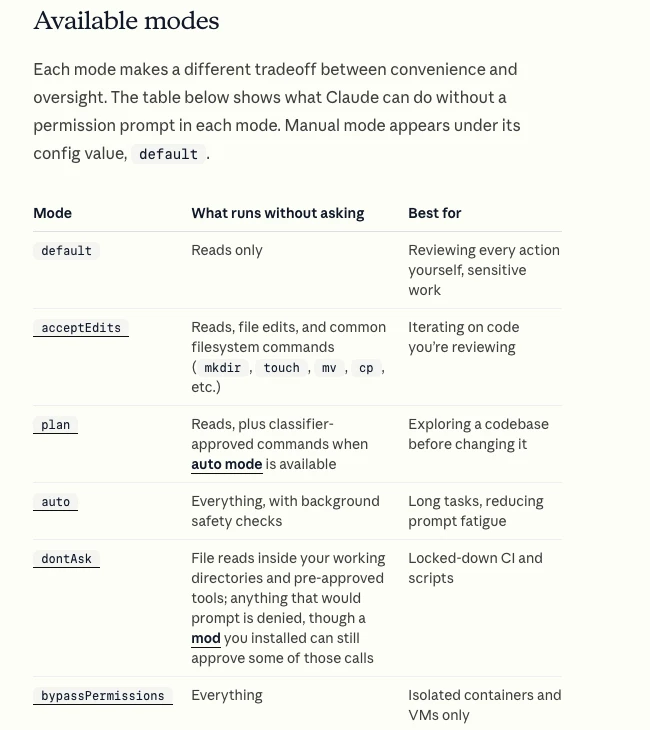
The permission modes page lays them out.
- Manual asks before anything but reading. Safe, and slow after the tenth approval.
- Accept edits lets Claude change files and run basic file commands in your folder. It still asks before other commands.
- Plan reads and proposes only.
- Auto runs everything while a separate classifier model blocks what looks risky. From version 2.1.283 it is the starting mode for terminal and VS Code sessions.
- Bypass permissions skips the prompts. The docs say to use it only in isolated containers and VMs.
For a first week, Auto or Accept edits is a fine default on a project you can afford to break. Switch to Plan for anything that touches money, logins or real customer data.
Step 8. Save Your Work Like You Mean It
Press Esc twice, or type /rewind, and Claude Code opens a rewind menu. You can roll back the chat, the code, or both, to any earlier prompt. It feels like a safety net. It is a thin one.
The best practices page warns that checkpoints only track changes made by Claude's own file editing tools. A file changed by a shell command is not captured. Anthropic says plainly that it is not a replacement for git.
So commit after every piece that works. You don't need to learn git first. The quickstart shows prompts like "commit my changes with a descriptive message" and "show me the last 5 commits." Claude runs the commands. You get a save point you can return to tomorrow, even if the session is gone.
Step 9. Write a Short CLAUDE.md, Then Keep the Chat Clean
Run /init and Claude writes a starter CLAUDE.md file for your folder. Claude reads that file at the start of every session. Put in what it cannot guess. The command that builds your site, a rule like "never edit the live database," where the tests live.
Keep it short. Anthropic's advice is to ask of each line whether removing it would cause mistakes, and to cut it if not. A long file makes Claude skip the rules that matter. Run /context to confirm Claude loaded it.
Then manage the chat itself. Everything Claude reads, writes or runs fills its context window, and the same docs say quality drops as it fills. We wrote about why in the context problem.
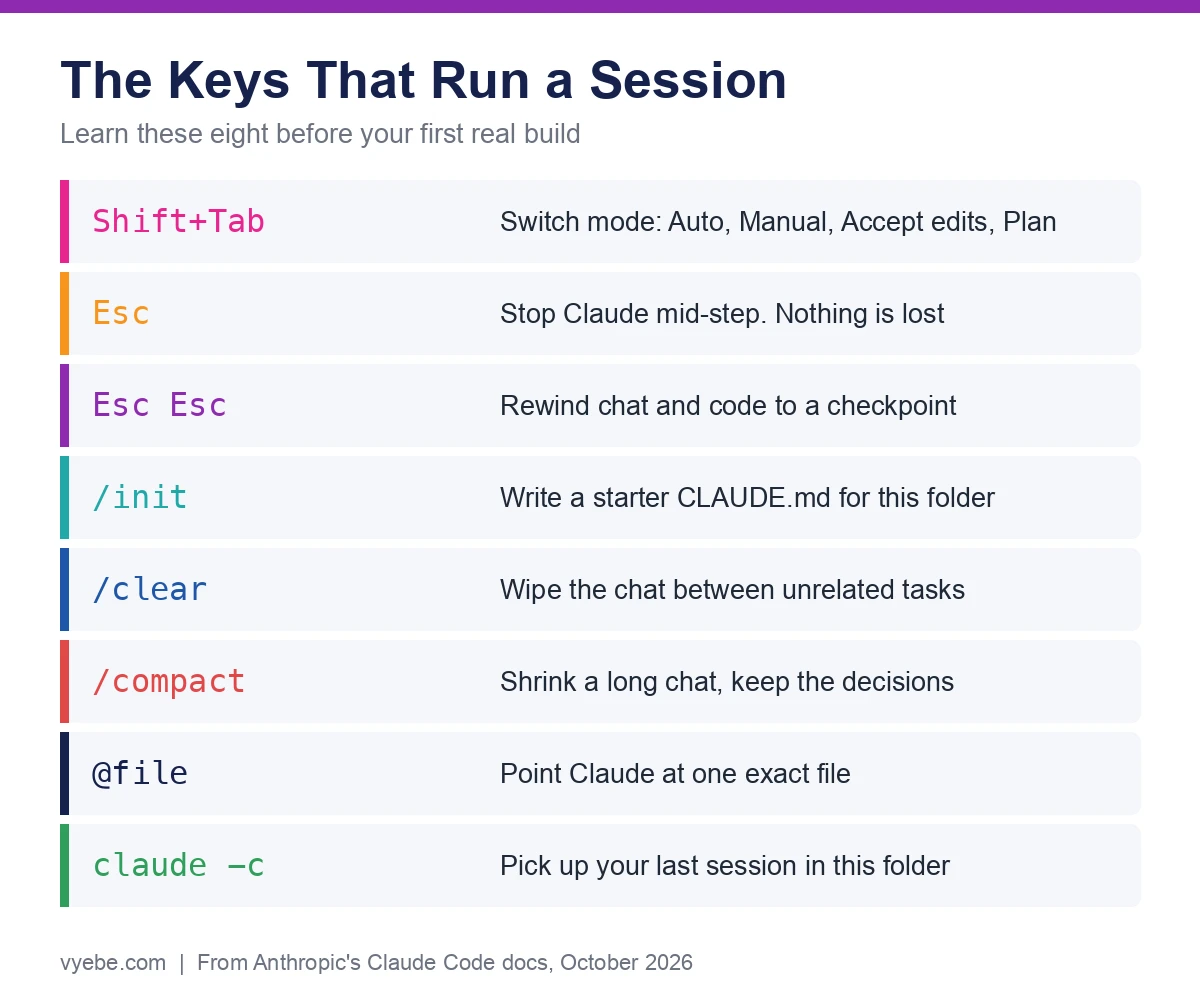
/clearbetween unrelated tasks./compactwith a note, like/compact keep the list of changed files, when one task runs long.@plus a file name to point Claude at the exact file.claude -cthe next morning to pick up where you stopped.
One rule from Anthropic we follow daily. If you have corrected Claude twice on the same thing, stop. Run /clear and write a better first prompt with what you learned. A clean session with a sharp prompt beats a long one full of failed tries.
What Our Own Sessions Taught Us
These are our numbers, from the agent sessions that build and run our own sites.
Every automatic step needs a cost check. Between September 11 and 25, 2026, our sessions set off 760 paid production deploys on our hosting, almost all of them avoidable. Loops that tuned a site pushed live after every small change. On October 9 one session pushed 22 deploys to a single site in one day. Nobody had told the sessions that a push costs money. The fix was one line in each project's instructions to batch changes and push once.
Shared folders need a rule in writing. On October 17 one of our sessions squashed its work onto a newer copy of the main branch. That quietly undid another session's work, and it went live. We fixed it 20 minutes later. Now our standing instructions say to compare the change against main before any push, and to stop if a file shows up that the session did not touch.
The instruction file is where lessons go. Both fixes became one line in a CLAUDE.md or a skill. That is the real job of the file. Not a description of your code, but the list of things that already went wrong once.
If you are past the first hour and stuck halfway through a build, our project rescue page is where we pick those up.
Bad Advice We Keep Seeing
"Skip permissions from day one." The most linked how-to page for this search, Builder.io's post from July 2025, tells readers to launch with --dangerously-skip-permissions every time. That made sense before Auto mode existed. Today Auto gives you the same quiet session with a safety check on each action. Bypass is for a throwaway container, not your laptop.
"Install Node.js first." Product Talk's widely shared beginner guide from October 2025 starts non-technical readers at nodejs.org. Even Google's AI answer for this search says Node is required. Anthropic's current quickstart lists no such step for the native installer. One line, and you are done.
"Ask for the whole app at once." One giant prompt and a finished app looks great in a demo. On a real project it produces the kitchen sink session that Anthropic's own docs list as a common failure. Small pieces, each with a check, get you further in the same hour.
Still Wondering?
- How do you use Claude Code effectively?
Start in plan mode, build one small piece at a time, and give Claude a test or screenshot it can check. Commit after each piece works. Run
/clearbetween unrelated tasks, and keepCLAUDE.mdshort.- Do I need to know how to code to use Claude Code?
No. You describe what you want in plain English and Claude writes the code. Anthropic's terminal guide is written for people who have never opened a terminal. You do need to test what it builds and say clearly what "done" means.
- Is there any way I can use Claude Code for free?
Not on the free Claude plan, which does not include it. The cheapest plan is Pro at $20 a month, or $17 billed yearly. You can also sign in with a Claude Console account and pay per use from prepaid credit.
- Do I need Node.js to use Claude Code?
Not with the native installer. One command installs it on Mac, Linux, WSL or Windows, and it updates itself in the background.
- Can I use Claude Code without the terminal?
Yes. The Claude desktop app has a Code tab for Mac and Windows, with Linux in beta. You pick a folder, a permission mode and a model with buttons, and see changes in a diff view.
- What is plan mode in Claude Code?
Plan mode lets Claude read your files and write a plan without editing anything. Press Shift+Tab until it shows plan mode on, or put
/planin front of one prompt. Edits stay blocked until you approve the plan.- How do I undo something Claude Code did?
Press Esc twice or type
/rewindto roll the chat and code back to an earlier prompt. Rewind only tracks Claude's own file edits, so commit to git after each working piece. Then you can always go back.
Like this guide? Add Vyebe as a preferred source on Google and see more of our posts when you search.
The Paper Trail
- Claude Code docs, Quickstart, sign in options, first prompts, git prompts and essential commands, accessed October 2026
- Claude Code docs, Best practices, verification, the four phase workflow, CLAUDE.md, rewind, context and failure patterns, accessed October 2026
- Claude Code docs, Permission modes, every mode, the Shift+Tab cycle and plan mode, accessed October 2026
- Claude Code docs, Desktop, the Code tab, environments, permission labels and the browser pane, accessed October 2026
- Claude Code docs, Terminal guide for new users, opening a terminal and basic controls, accessed October 2026
- Anthropic, Plans and pricing, Pro and Max prices and which plans include Claude Code, accessed October 2026
- Builder.io, How I use Claude Code, July 11, 2025, the most linked guide we compared against, accessed October 2026
- Product Talk, Claude Code for non-technical people, October 29, 2025, accessed October 2026
Stalled somewhere in here?
Send us the project and what's blocking you. You'll get a straight read on what's actually wrong, including if it's something you can fix yourself.
Tell us what happenedWorth Reading
Claude Code Skills Explained, Plus 7 to Install First
Claude Code skills are SKILL.md files that load only when needed. What they are, where they live, the 7 we would add first, and how to vet one before you trust it.
Getting StartedBase44 Pricing Is $0 to $200 a Month, Paid in Credits
Base44 costs $0, $20, $50, $100 or $200 a month, 20% less yearly. What each credit buys, what a small app really burns, and the limits that catch new builders.