
Claude Code Skills Explained, Plus 7 to Install First
Claude Code skills are SKILL.md files that load only when needed. What they are, where they live, the 7 we would add first, and how to vet one before you trust it.
The costly mistake with Claude Code skills is installing a giant pack on day one. One popular GitHub repo bundles more than 380 of them. Every skill you add puts its description in front of Claude on every turn, and a skill is instructions your agent will follow. Install a few that match work you repeat, read each one first, and write your own for the rest.
We run 98 personal skills on the machine that builds this site. That pile taught us most of what follows. Every figure below links to where it came from.
Inside This Post
9 sections
What a Claude Code Skill Actually Is
Anthropic's skills docs put it plainly. You write a SKILL.md file with instructions, and Claude adds it to its toolkit. It uses the skill when relevant, or you call it with a slash.
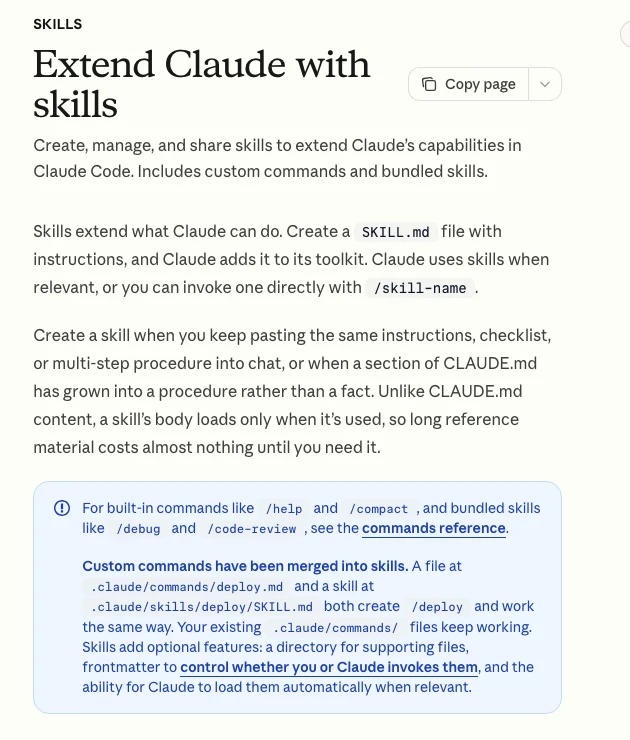
The trick that makes skills useful is when they load. Only the name and description sit in Claude's context all the time. The body loads when the skill is used. So a 300 line deploy checklist costs almost nothing until the moment you deploy.
Two more facts from the same page matter for beginners.
Custom commands became skills. A file at .claude/commands/deploy.md and a skill at .claude/skills/deploy/SKILL.md both create /deploy. Old command files keep working.
Skills follow an open standard. The format comes from Agent Skills, which other tools read too. That is why the Superpowers repo has install steps for Codex, Cursor, Gemini CLI and more than a dozen other agents.
Skills, CLAUDE.md, MCP and Hooks Are Different Jobs
People mix these up all the time. The split is simple once you see it.
| Tool | What it does | When it loads | Use it for |
|---|---|---|---|
CLAUDE.md | Facts about your project | Every session | Build command, folder layout, house rules |
| Skill | A procedure or reference | Only when used | Checklists, workflows, long reference docs |
| MCP server | New tools Claude can call | When connected | A database, a browser, an outside API |
| Hook | A script that always runs | On an event | Rules that must never be skipped |
The docs say to make a skill when you keep pasting the same instructions, or when a part of CLAUDE.md has grown into a procedure. We cover MCP on its own in MCP explained, and why a bloated CLAUDE.md hurts in the context problem.
Where Skills Live and Who Can Start Them
Where you save a skill decides where it works.
| Location | Path | Works in |
|---|---|---|
| Personal | ~/.claude/skills/<name>/SKILL.md | All your projects on this machine |
| Project | .claude/skills/<name>/SKILL.md | That repo, for everyone who clones it |
| Plugin | <plugin>/skills/<name>/SKILL.md | Wherever the plugin is turned on |
| claude.ai account | Skills enabled on your account | Cowork, cloud and signed in terminal sessions |
That table is trimmed from the docs, which also list enterprise, nested and extra directory locations.
By default both you and Claude can start any skill. Two settings in the frontmatter change that.
disable-model-invocation: truemeans only you can start it. The docs use deploy and send message skills as the example, because you don't want Claude deciding to deploy because the code looks ready.user-invocable: falsehides it from your slash menu. Claude can still load it as background knowledge.
A manual only skill has a bonus. Its description is not loaded into context at all, so it costs nothing until you type it.
The Description Is the Whole Game
Claude picks skills by reading descriptions. A vague one never fires. A greedy one fires on everything.
The docs give hard numbers here. The description plus the optional when_to_use text is cut at 1,536 characters in the skill listing. The whole listing gets a budget of 1% of the model's context window. When you have too many skills, Claude Code starts dropping descriptions, starting with the ones you use least.
So write the description like a trigger, not a summary.
---
name: release-notes
description: Writes customer facing release notes from merged pull requests. Use when the user asks for release notes, a changelog, or what shipped this week.
disable-model-invocation: true
---
Put the main use first. Use the words you would really type. Keep the body short too, since the docs warn that once a skill loads, every line stays in context across turns. They suggest keeping SKILL.md under 500 lines and moving long reference material into separate files beside it.
What We Learned From 98 of Them
We counted every personal skill on our build machine. It is the clearest picture we have of what happens when skills pile up.
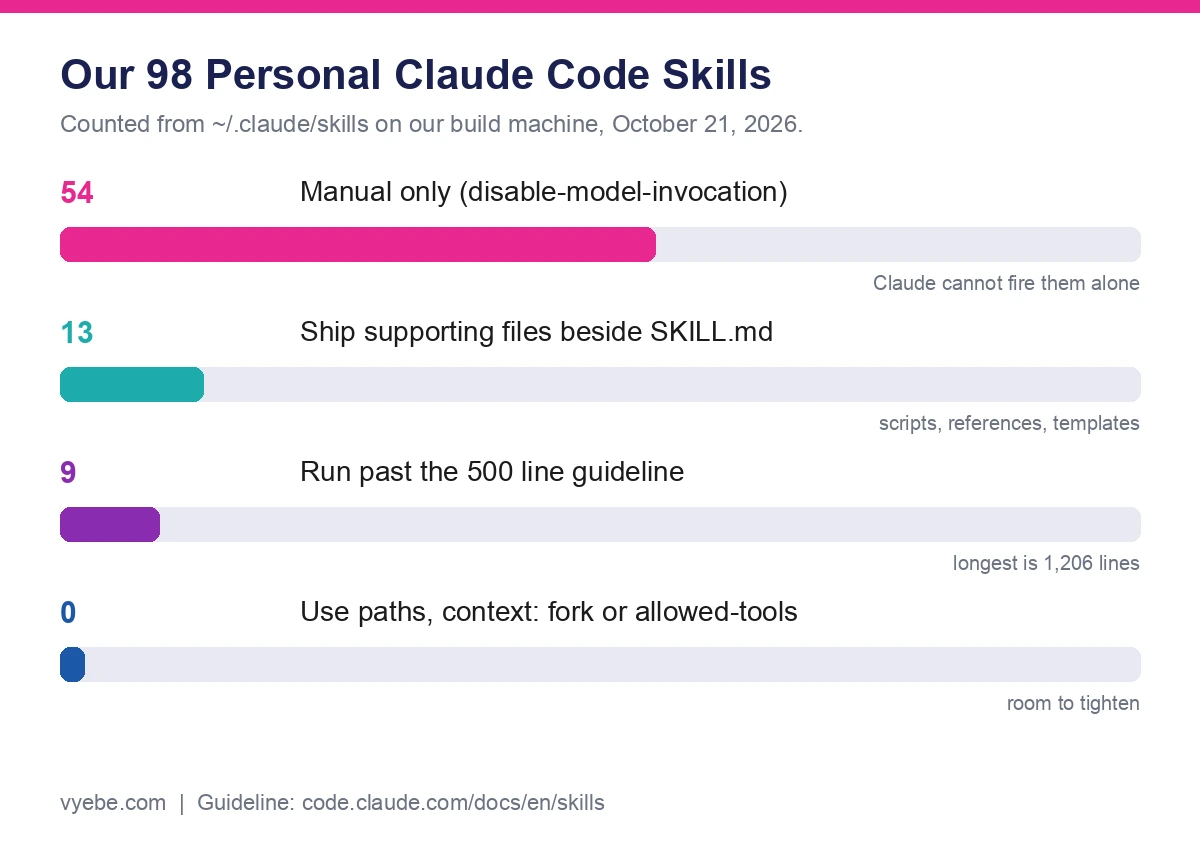
Four things stood out.
More than half are manual only. 54 of 98 set disable-model-invocation. Most of those are long playbooks we only want when we ask. That keeps their descriptions out of every turn.
The descriptions add up. Together they run to 37,077 characters. The longest single description is 1,087 characters. That is all text Claude has to scan before it picks one.
Nine are too long. They pass the 500 line guideline, and the biggest is 1,206 lines. Those are the ones that drift. Claude follows the top and loses the bottom after a long session, which the docs also warn about after compaction.
None use the sharper tools. Not one sets paths, context: fork or allowed-tools. paths would keep a skill quiet until Claude touches matching files. context: fork runs it in its own subagent so it does not fill the main chat. We have room to tighten, and so will you.
The 7 Skills We Would Install First
These are ranked for someone building real apps, not for collectors. The first three you already have.
/doctor, built in. A setup checkup. It flags broken installs, unused skills and MCP servers by context cost, and aCLAUDE.mdthat has grown too big. Run it first./code-review, built in. Reviews your current diff or a pull request for real bugs. Add--fixto apply what it finds./runand/verify, built in. They launch your app and check a change works in the running app, not just in tests. Run/run-skill-generatoronce so they learn your project's start steps.skill-creator, from Anthropic. It helps you write, test and score your own skills. It lives in the anthropics/skills repo.- The document skills, from Anthropic. PDF, Word, Excel and PowerPoint handling. Add the marketplace with
/plugin marketplace add anthropics/skills, then/plugin install document-skills@anthropic-agent-skills. frontend-design, official plugin. In its own words, it steers Claude toward design choices that don't read as templated defaults. We run it from the official marketplace asfrontend-design@claude-plugins-official.- Superpowers, if you want a full method. More on this one below.
Superpowers, the Most Starred Skill Pack
Superpowers by Jesse Vincent is a whole way of working, built from skills. It asks what you really want, writes a spec, makes a plan, then runs subagents through the tasks with tests first. Its README says agents can run for a couple of hours without leaving the plan.
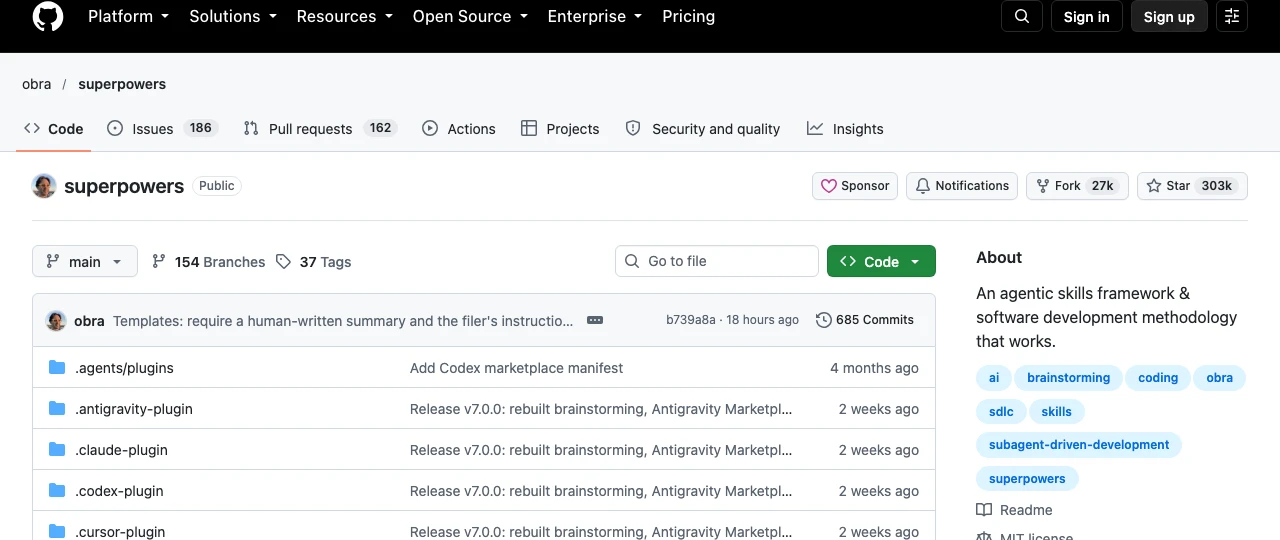
It had 302,919 stars on GitHub when we checked, more than the 182,653 on Anthropic's own skills repo. It installs with /plugin install superpowers@claude-plugins-official.
We have not adopted it, and the reason is useful. Superpowers wants to run your whole process. If you already have your own way of planning and checking work, it will fight you. If you have no process yet, it gives you a good one on day one. Also note its README says the optional visual companion loads a logo from the maker's site with the version number. You can turn that off with SUPERPOWERS_DISABLE_TELEMETRY.
Vet a Skill Before You Trust It
A skill is not a library you call. It is text dropped into your agent's head, and your agent has your files and your terminal.
Snyk's ToxicSkills audit scanned 3,984 skills from ClawHub and skills.sh. It found 534, or 13.4%, with at least one critical issue. 1,467, or 36.82%, had some security flaw. Human review confirmed 76 as malicious. The tricks included install steps that fetch malware, hidden data theft in setup commands, and instructions to turn off protections.
Before you install anything outside the official marketplaces, do this.
- Read the whole
SKILL.md. If it tells Claude to download, run or send anything, ask why. - Read every script beside it. Skills can ship code, and Claude will run it.
- Look for
allowed-tools. It lets Claude use those tools without asking during that turn. - Check the source. Prefer Anthropic's repos, the official marketplace and makers with real history.
- Turn off what you don't use. The
/skillsmenu can set any skill to off or name only.
We print the full text of our own public skills on our skills page for exactly this reason. You should be able to read the payload before it runs. You can also block skills by name with permission rules like Skill(deploy *), and Snyk is in our tool list if you want a scanner.
Write Your First Skill in Five Minutes
The best skill is usually the one you write about your own work. Anthropic's first example builds a change summary skill, and it shows the trick of pulling live data in before Claude reads it.
mkdir -p ~/.claude/skills/summarize-changesThen save this as ~/.claude/skills/summarize-changes/SKILL.md.
---
description: Summarizes uncommitted changes and flags anything risky. Use when the user asks what changed, wants a commit message, or asks to review their diff.
---

## Current changes

!`git diff HEAD`

## Instructions

Summarize the changes above in two or three bullet points, then list any risks.
The line that starts with an exclamation mark runs git diff HEAD first and pastes the output into the skill. Claude then works from your real changes, not a guess. Ask "what did I change?" or type /summarize-changes to try it.
If you are new to the tool, start with how to install Claude Code and what each plan costs in Claude Code pricing explained.
Bad Advice We Keep Seeing
"Install the top 50 skills." Lists like that ignore the listing budget. Past a point, descriptions get dropped and the skill you need stops firing.
"Use every character of the description." The open Agent Skills spec allows 1,024 and Claude Code cuts its listing at 1,536. Neither is a target. Claude decides from the first line or two, and every extra word costs context on every turn.
"Skills are just prompts, so they are safe." A skill can carry scripts and can pre-approve tools. Treat it like code from a stranger.
"Put everything in CLAUDE.md." That file loads every session. A procedure you use once a week belongs in a skill.
Still Wondering?
- What are Claude Code skills?
Skills are folders with a
SKILL.mdfile that teach Claude a task or give it reference material. Claude sees each skill's description all the time and loads the full instructions only when the skill is used.- Where do I put Claude Code skills?
Personal skills go in
~/.claude/skills/<name>/SKILL.mdand work in every project on your machine. Project skills go in.claude/skills/<name>/SKILL.mdinside the repo, so your team gets them too.- How do I make Claude use my skill?
Type
/skill-nameto run it yourself. For automatic use, write a description that names the task first and includes the words you would really type. If it still does not fire, check that the frontmatter parses withclaude plugin validate.- What is the difference between a skill and an MCP server?
An MCP server gives Claude new tools, like a database or a browser. A skill gives Claude instructions for how to do a job. They often work together, with the skill saying how to use the tools.
- Do skills use up tokens?
The descriptions do, on every turn, unless a skill is manual only. The full body only counts once the skill is loaded, and then it stays in context. Run
/skill-doctorto see which skills cost the most and which you never use.- Are Claude Code skills safe?
Official ones from Anthropic are a safer start. Public skills vary a lot, and one audit found 13.4% of 3,984 had a critical issue. Read the
SKILL.mdand any scripts before you install.- Can I use Claude Code skills in Codex or Cursor?
Often yes. Skills follow the Agent Skills open standard, and packs like Superpowers ship installs for Codex, Cursor and other agents. Claude Code adds extra frontmatter fields that other tools may ignore.
Like this guide? Add Vyebe as a preferred source on Google and see more of our posts when you search.
The Paper Trail
- Claude Code docs, Extend Claude with skills, October 2026
- Claude Code docs, Commands reference, bundled skills, October 2026
- Agent Skills open standard and its specification, October 2026
- anthropics/skills on GitHub, star count and install steps, October 2026
- obra/superpowers on GitHub, README, install steps and telemetry note, October 2026
- alirezarezvani/claude-skills on GitHub, the 380 plus skill pack, October 2026
- Snyk, ToxicSkills audit of agent skills, October 2026
- Takeda, How to Build a Production-Ready Claude Code Skill, Towards Data Science, October 2026
Run the audit on your own database
The whole procedure is published as a free agent skill, including the read only SQL. Every section of it came out of something that was live and wrong.
Read the skill in fullWorth Reading
Base44 Pricing Is $0 to $200 a Month, Paid in Credits
Base44 costs $0, $20, $50, $100 or $200 a month, 20% less yearly. What each credit buys, what a small app really burns, and the limits that catch new builders.
Getting StartedCursor vs Claude Code Compared After Cursor Joined SpaceX
Cursor vs Claude Code in October 2026. Cursor now bills Claude at API rates. Current plans, models and limits, plus our own token log priced both ways.