
Codex vs Claude Code Compared on Price, Limits and Safety
Codex vs Claude Code in October 2026. Current plans, published limits, API rates, sandbox defaults and our own 24 day usage log, so you can pick the right agent.
Pick Codex if you want a free or $8 way in, published usage limits and a sandbox that is on by default. Pick Claude Code if you will code most days, want Opus 5.5 as the default model even on a $20 plan, and care more about hooks, skills and long sessions than about price per message. Both start at $20 a month, and both now run in a terminal, an editor, a desktop app and the browser.
We run Claude Code all day to build the sites and apps we write about here. So we are not neutral, and we will not pretend we ran a lab test of both. What we can give you is current prices and limits from both vendors, plus 24 days of our own usage logs priced on both price lists. That last part is something no other page on this topic has.
Before anything else, the quick points.
- Codex has a free tier. Claude Code does not. OpenAI lists Codex on Free and on an $8 Go plan. Claude Code starts at Pro.
- Both cost $20 to start for real work. ChatGPT Plus and Claude Pro are both $20 a month.
- OpenAI publishes message ranges. Anthropic does not. Plus gets 15 to 160 local GPT-6.1 Sol messages per five hours.
- The API rates are close. GPT-6.1 Sol and Sonnet 5.5 both list $2 in and $10 out per million tokens.
- Codex sandboxes by default. Claude Code starts in auto mode, where a second model reviews risky actions.
- For heavy users, the plan decides the bill. Our 24 days would have cost $6,232 to $13,290 at API rates.
Inside This Post
8 sections
What Codex and Claude Code Actually Are
Both are coding agents. You type what you want in plain words. The agent reads your files, writes code, runs commands, and keeps going until the job is done or it needs you.
Codex is OpenAI's agent. It comes with ChatGPT plans. OpenAI's docs list six places to use it, the ChatGPT desktop app, the ChatGPT mobile app, ChatGPT on the web, the Codex CLI, an IDE extension and Codex Cloud. The CLI is open source under the Apache 2.0 license on GitHub, where it showed about 130,000 stars on October 18, 2026.
Claude Code is Anthropic's agent. It comes with Claude plans. The Claude Code overview lists the terminal, VS Code, JetBrains, a desktop app and the web, plus the Claude app for iOS and Android. It also plugs into Slack, GitHub Actions and Chrome.
The two have copied each other a lot this year. Both have cloud tasks you can start and check on later. Both read a project instruction file. So the old "terminal tool vs cloud tool" split no longer holds. The real gaps now are price, limits, default model and how each one keeps you safe.
| Codex | Claude Code | |
|---|---|---|
| Made by | OpenAI | Anthropic |
| Cheapest plan with it | Free, $0 (rolling out) | Pro, $20 a month |
| Models on a $20 plan | GPT-6.1 Sol and GPT-6 Luna | Opus 5.5 by default |
| Instruction file | AGENTS.md | CLAUDE.md, can also read AGENTS.md |
| Cloud tasks | codex cloud and Codex Cloud | Claude Code on the web, claude --cloud |
| Starting safety setup | OS sandbox, asks before leaving it | Auto mode, a classifier reviews actions |
Models and plan names come from OpenAI's Codex pricing page and Anthropic's model config docs, both opened October 18, 2026.
Every Plan That Includes Each Agent
All prices are US list prices per month before tax, as shown on October 18, 2026.
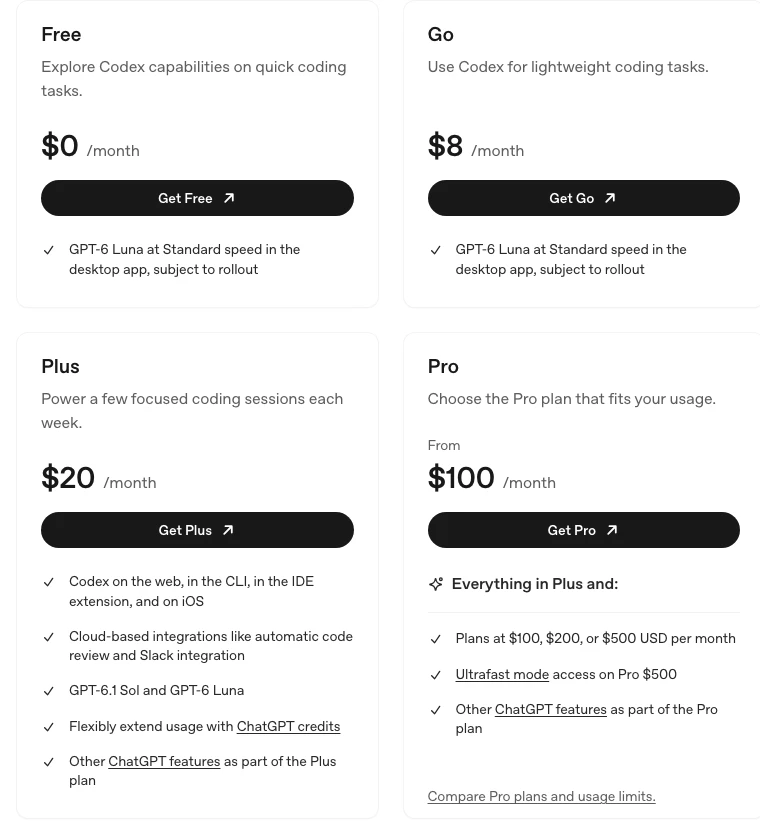
| Price | Codex (ChatGPT plans) | Claude Code (Claude plans) |
|---|---|---|
| $0 | Free, GPT-6 Luna in the desktop app, subject to rollout | Not included |
| $8 | Go, GPT-6 Luna in the desktop app, subject to rollout | No plan at this price |
| $17 to $20 | Plus, $20, Codex on web, CLI, IDE and iOS | Pro, $20, or $17 billed yearly |
| $20 to $25 a seat | Business, $25 monthly or $20 billed yearly | Team Standard, $25 monthly or $20 billed yearly |
| $100 | Pro $100 | Max 5x, includes $100 of API credits |
| $125 a seat | No match | Team Premium, 5x a Standard seat |
| $200 | Pro $200 | Max 20x, includes $200 of API credits |
| $500 | Pro $500, adds Ultrafast mode | No plan at this price |
| Pay as you go | API key at API rates | API key at API rates |
Claude prices come from claude.com/pricing. Codex prices come from OpenAI's Codex pricing page.
Two things stand out.
Codex has the cheaper door. If you just want to see what an agent feels like, Codex lets you try it on Free or Go. Claude Code has no free way in. We cover the cheapest ways in on the Claude side in Claude Code pricing explained.
Claude puts its best default model on the $20 plan. Anthropic's model docs say Pro, Max, Team, Enterprise and the API all default to Opus 5.5 in Claude Code. On ChatGPT Plus, Codex offers GPT-6.1 Sol and GPT-6 Luna. GPT-6 Astra, the priciest model on OpenAI's credits table, has the tightest limits.
Usage Limits, Side by Side
This decides how much work you get done for $20.
OpenAI publishes ranges. For Plus and Standard Business seats, the Codex pricing page lists these local messages per five hour window.
| Model on Codex | Local messages per 5 hours (Plus) |
|---|---|
| GPT-6 Astra | 5 to 45 |
| GPT-6.1 Sol | 15 to 160 |
| GPT-6 Sol | 15 to 150 |
| GPT-6 Luna | 350 to 3,000 |
The same page says cloud tasks can use more of your allowance than local messages, and weekly limits may also apply. Pro plans currently have no five hour limit. Fast mode uses 2.5x the included usage.
Anthropic publishes the rule, not the count. Claude limits reset on a rolling five hour session window, with weekly limits on top for paid plans. Max gives 5x or 20x the Pro usage per session. Your chat in the Claude app and your Claude Code work share one pool.
So which is more generous at $20? You can plan around the Codex number. You cannot plan around the Claude number, because there isn't one. If you code a few hours a week, either $20 plan is fine.
One more date to know. OpenAI's page says GPT-5.5 retired from Codex with ChatGPT sign in on October 14, 2026. Any guide that still tells you to pick GPT-5.5 in Codex is out of date.
What It Costs on the API
If you sign in with an API key instead of a plan, you pay per token. These are the rates per million tokens on October 18, 2026, from OpenAI's API pricing (short context, up to 272K input tokens) and claude.com/pricing.
| Model | Input | Cached input | Output |
|---|---|---|---|
| GPT-6 Astra | $10 | $1 | $50 |
| Fable 5.1 | $10 | $0.25 | $50 |
| Opus 5.5 | $4 | $0.20 | $20 |
| GPT-6.1 Sol | $2 | $0.10 | $10 |
| Sonnet 5.5 | $2 | $0.10 | $10 |
| GPT-6 Luna | $0.10 | $0.01 | $0.50 |
| Haiku 5.5 (up to 100K tokens) | $0.10 | $0.01 | $0.50 |
Read that table twice. GPT-6.1 Sol and Sonnet 5.5 have the same list price. GPT-6 Luna and Haiku 5.5 match too. The real difference is Claude's cache write charge. Anthropic bills $5 per million to write the cache on Opus 5.5 and $2.50 on Sonnet 5.5. OpenAI's table lists no cache write fee.
What Our Own Usage Would Cost
Nobody else has this part. We pulled our own Claude Code logs from one Mac for September 22 to October 18, 2026. That is 24 working days, 4,206 sessions and 190,259 model calls. About 95 percent of those calls ran on Opus 5.5.
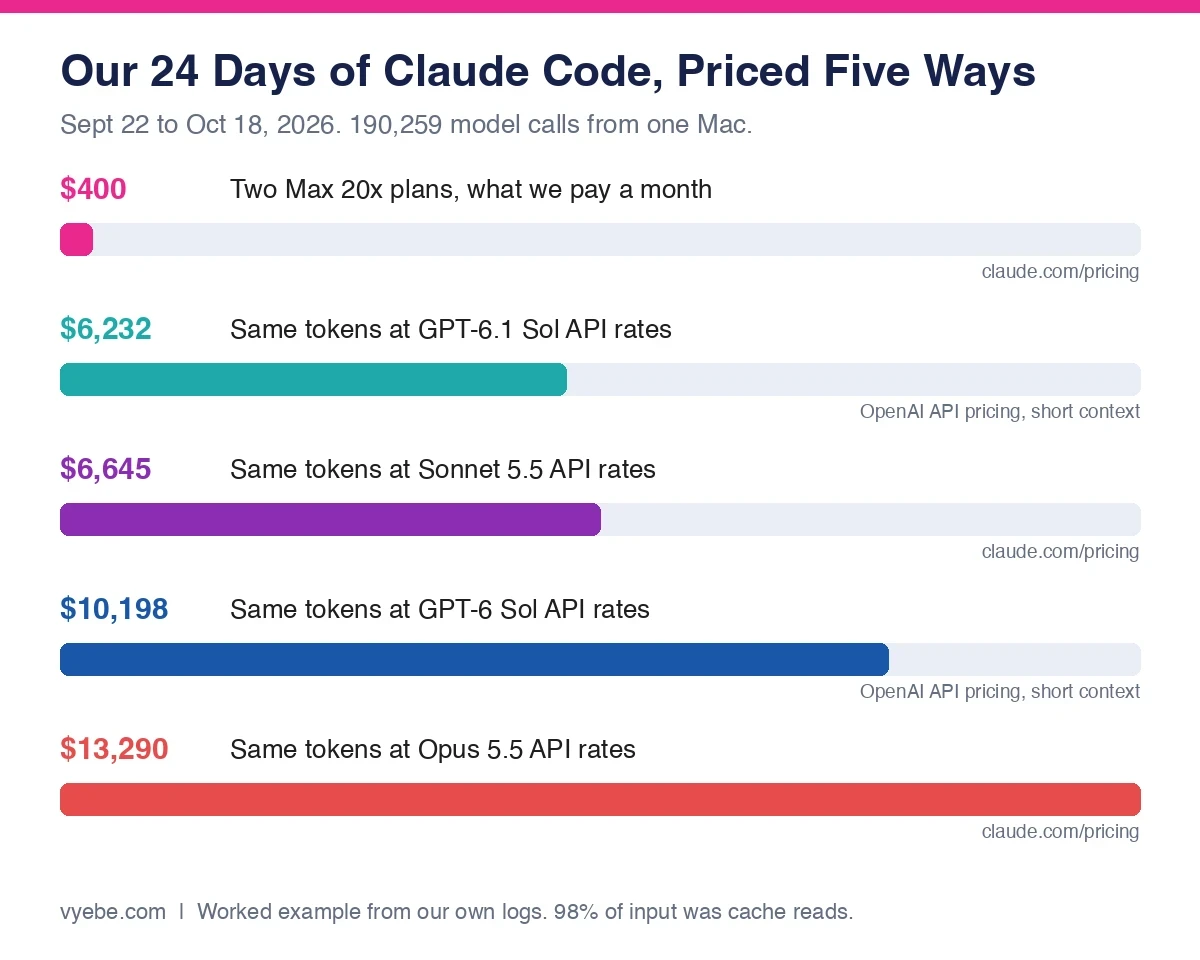
The token mix was lopsided. 39.7 billion tokens were cache reads, 826 million were cache writes, and 61 million were output. Cache reads were 98 percent of everything going in.
We priced that exact mix on each price list. This is a worked example, not a bill. Codex may not use the same number of tokens for the same work, and some of our calls ran past OpenAI's 272K short context line, so the OpenAI figures are a floor.
| Priced as | Cost for our 24 days |
|---|---|
| Two Max 20x plans (what we pay) | $400 a month |
| GPT-6.1 Sol API | $6,232 |
| Sonnet 5.5 API | $6,645 |
| GPT-6 Sol API | $10,198 |
| Opus 5.5 API | $13,290 |
The lesson is not "Codex is cheaper" or "Claude is cheaper." It is that a heavy user should never be on the API for either one. At our level of use, the flat plan is worth about 15 to 33 times its price. Pick the plan, then pick the agent.
Our tool log also shows what an agent spends its day doing. Of 225,515 tool calls, 51 percent were shell commands. File reads were 6 percent. Edits and new files together were under 6 percent. The agent spends most of its time running and checking things, not typing code. That is why the safety setup in the next section matters more than people think.
Safety Defaults Are the Biggest Real Difference
Half of everything our agent did was run commands on a real machine. So how each tool limits those commands is not a footnote.
Codex starts inside an OS sandbox. OpenAI's sandboxing docs describe three sandbox modes, read-only, workspace-write and danger-full-access. The default "Ask for approval" preset uses workspace-write. The agent can edit files and run routine commands inside your project, and it asks when it needs to go past that line. The walls are enforced by the operating system, with Seatbelt on macOS, bubblewrap on Linux and WSL2, and a native sandbox on Windows.
Claude Code starts in auto mode. Anthropic's permission modes docs say auto mode is the starting mode for interactive terminal and VS Code sessions on version 2.1.283 or later. In auto mode, a second model reviews actions instead of you. Claude Code also has an OS level Bash sandbox on macOS, Linux and WSL2, but you turn it on with /sandbox.
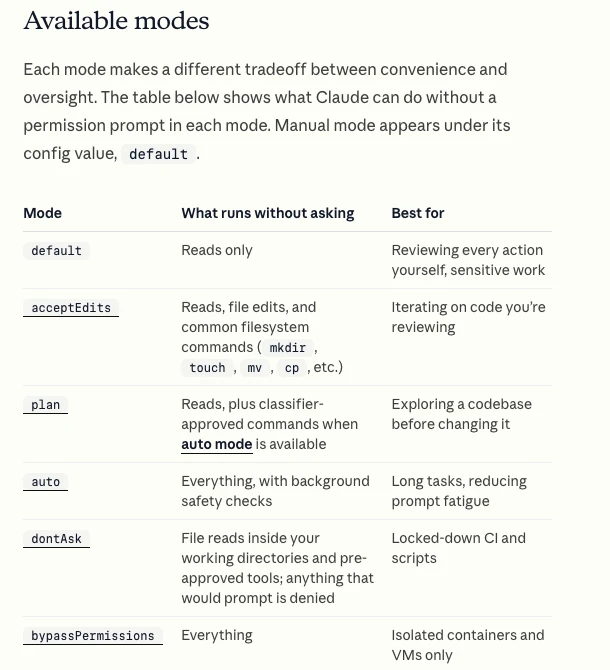
Neither approach is wrong. A sandbox stops whole classes of mistakes, but it gets in the way when a task truly needs the network. A reviewer model lets more work flow, but it is a judgment call, not a wall. If you are new and you let the agent run on your laptop, turn on the Claude Code sandbox or keep Codex in its default preset. Never use the "skip everything" options outside a throwaway container. Claude's docs say bypass mode is for isolated containers and VMs only.
This matters most for apps that touch real data. An agent with full access and a database key can do real damage in seconds. We wrote up what that looks like in the view that ignored RLS, and the launch checks we use in shipping to production.
Which One Should You Use?
This is how we would pick for people building apps, not for people paid to write code.
| You are | Pick | Why |
|---|---|---|
| Curious, not ready to pay | Codex on Free or Go | The only agent with a $0 or $8 way in |
| Already paying for ChatGPT Plus | Codex | It is included, and you get published limits |
| Building one real app, most days | Claude Code on Pro, then Max | Opus 5.5 is the default even on $20 |
| Running long sessions all day | Either one on a $100 or $200 plan | Our log shows the API costs about 15 to 33 times more |
| Nervous about the agent touching your machine | Codex, or Claude Code with /sandbox on | Codex sandboxes by default |
| Wanting hooks, skills and plugins | Claude Code | The deepest setup options we have used |
Can you use both? Yes. Claude Code can read an AGENTS.md file, so one instruction file can serve both agents. Two $20 plans cost less than one $100 plan, and some builders use one agent to review the other's work, per the Morph comparison linked below.
If you are still choosing your first tool, start with choosing your first AI coding tool. Our resource pages on Claude Code and OpenAI Codex cover what each one is good at and what to watch.
Bad Advice We Keep Seeing
The advice on this topic is better than most comparison pages. But it ages fast, and three problems keep coming up.
Old models. The most linked page we checked, from Morph, carries an October 5 recheck date and still compares Opus 5 against GPT-5.6 Sol. Today Claude Code defaults to Opus 5.5 and Codex on Plus offers GPT-6.1 Sol. Duet's page from May compares Opus 4.6 with GPT-5.3-Codex. MindStudio's page, updated in July, still names Sonnet 4 and Opus 4.
Old plans. Several pages list ChatGPT Pro only at $100 and $200. OpenAI now lists a $500 Pro plan with Ultrafast mode, and says Pro has no five hour limit at all right now.
Benchmarks without the bill. Leaderboard scores for models that are no longer the default do not tell you what you will pay. Most pages skip the one question that decides the cost, which is whether you should be on a plan or the API.
Still Wondering?
- Is Codex better than Claude Code?
Neither is better at everything. Codex has a free tier, published limits and a sandbox on by default. Claude Code uses Opus 5.5 by default on every paid plan and has deeper hooks and skills. Pick by budget, how often you code and how much you trust the agent on your machine.
- What are the usage limits for ChatGPT Codex?
On Plus and Standard Business seats, OpenAI lists 15 to 160 local GPT-6.1 Sol messages per five hours, 350 to 3,000 for GPT-6 Luna, and 5 to 45 for GPT-6 Astra. Cloud tasks use more. Weekly limits may apply. Pro plans currently have no five hour limit.
- Is Codex free to use?
Partly. OpenAI lists Codex on the Free plan with GPT-6 Luna in the desktop app, subject to rollout. The $8 Go plan is the same. Full Codex on the web, CLI, IDE and iOS starts with Plus at $20 a month.
- Is Claude Code free?
No. The free Claude plan does not include Claude Code. The cheapest way in is Pro at $20 a month, or $17 billed yearly. You can also pay per token with an API key.
- Can I use Codex and Claude Code on the same project?
Yes. Codex reads
AGENTS.md, and Claude Code can readAGENTS.mdin place of aCLAUDE.md. Keep one instruction file, commit often, and do not let both agents edit the same files at the same time.- Which is cheaper on the API, Codex or Claude Code?
At list price, GPT-6.1 Sol and Sonnet 5.5 both cost $2 in and $10 out per million tokens. Opus 5.5 costs $4 and $20. Claude adds a cache write charge that OpenAI does not list. For daily use, a flat plan beats the API on both sides.
- Is there a better coding AI than Claude?
It depends on the job. On cost per message at $20, Codex is easier to plan around because OpenAI publishes its limits. On default model quality per plan, Claude Code ships Opus 5.5 even on Pro. Try both $20 plans for a month on the same project before you move up.
Like this guide? Add Vyebe as a preferred source on Google and see more of our posts when you search.
The Paper Trail
- OpenAI, Codex pricing, plans, models, usage limits and the GPT-5.5 retirement date, accessed October 2026
- OpenAI, API pricing, per token rates for GPT-6 models, accessed October 2026
- OpenAI, Codex sandboxing, sandbox modes, presets and OS enforcement, accessed October 2026
- OpenAI, Codex CLI docs, install, AGENTS.md and
codex cloud, accessed October 2026 - openai/codex on GitHub, license and install options, accessed October 2026
- Anthropic, Plans and pricing, Claude plans, usage rules and API rates, accessed October 2026
- Claude Code docs, Overview, surfaces, AGENTS.md support and cloud sessions, accessed October 2026
- Claude Code docs, Model configuration, default model per plan, accessed October 2026
- Claude Code docs, Permission modes, auto mode and the Bash sandbox, accessed October 2026
- Morph, Codex vs Claude Code, October 2026, the most linked ranking page we compared against, accessed October 2026
- Duet, Codex vs Claude Code, May 2, 2026, compared for model names and pricing, accessed October 2026
- MindStudio, Claude Code vs OpenAI Codex, updated July 22, 2026, compared for model names, accessed October 2026
Stalled somewhere in here?
Send us the project and what's blocking you. You'll get a straight read on what's actually wrong, including if it's something you can fix yourself.
Tell us what happenedWorth Reading
How to Install Claude Code on Mac, Windows and Linux
Install Claude Code with one command on Mac, Windows or Linux, sign in, and fix the errors that stop most installs, from PATH to 403s and npm permissions.
Getting StartedClaude Code Pricing Explained for Pro, Max and the API
Claude Code costs $20 a month on Pro, $100 or $200 on Max, or pay per token on the API. Current prices, limits, a worked cost example and how to pick.