
4 Ways to Use Claude Code With GitHub, and Undo Mistakes
Connect Claude Code to GitHub four ways, from plain git to @claude in pull requests and cloud sessions. Setup, real costs, and how to undo a bad change.
The costly mistake is treating /rewind as your undo button and skipping git. Rewind only tracks the edits Claude makes with its own file tools. A file changed by a script, a package install or a subagent can stay changed after you rewind. So commit every piece that works and push it to GitHub. Then any mistake, yours or Claude's, is one command from gone.
We run several Claude Code sessions against the same repos every day, each on its own branch, so most of what follows is the setup we lean on. Every figure below links to where it came from.
Inside This Post
8 sections
The Four Ways Claude Code Talks to GitHub
Claude Code can reach GitHub in four different ways. They differ in where Claude runs and who starts the work.
| Setup | Where Claude runs | Who starts it | What it needs |
|---|---|---|---|
| Git in your terminal | Your computer | You, in a session | Git, and gh for pull requests |
GitHub Action (@claude) | GitHub's runners | Anyone with write access, by comment | The Claude GitHub App, a secret, a workflow file |
| Cloud session | Anthropic's servers | You, from a browser or phone | A connected GitHub account |
| GitHub MCP server | Your computer | You, in a session | A GitHub personal access token |
Most builders need only the first one on day one. Add the Action when other people file issues, and cloud sessions when you want work to keep going after you walk away.
Way 1. Git From Your Own Terminal
This is the one most people already have. Claude Code can read your history, write commits and open pull requests with nothing extra installed beyond git.
Ask in plain words. Anthropic's common workflows page shows prompts like "create a pr" and "enhance the PR description with more context." Pull requests go through the GitHub CLI, so install gh and run gh auth login once.
Claude asks before running shell commands. The permissions docs say every Bash command needs approval except a short list of read-only ones. You can save rules so commits run without a prompt while pushes stay blocked.
{
  "permissions": {
    "allow": ["Bash(git commit *)"],
    "deny": ["Bash(git push *)"]
  }
}
That rule has a gap, and the docs admit it. A push written another way, like git -C . push, doesn't match the text. If you truly need pushes blocked, use the sandbox or a hook instead of a text rule.
Two habits make the terminal setup safer.
Give each session its own worktree. Run claude --worktree feature-auth and Claude works in a separate copy of the repo on a branch named worktree-feature-auth. The worktrees page says the repo needs at least one commit first. Add .claude/worktrees/ to your .gitignore.
Find the session behind a PR. Run claude --from-pr 1234 and you get the sessions linked to that pull request. Claude Code links them when it creates the PR with gh pr create.
Claude Code also signs its work. The settings reference says commits get a Co-Authored-By trailer by default. The attribution setting changes or hides it.
Way 2. Mention @claude in Issues and Pull Requests
The Claude Code GitHub Action runs Claude on GitHub's own machines. Someone comments @claude fix the TypeError in the dashboard, and Claude replies in the thread, edits code and pushes commits.
Quick setup. Open claude in your repo and run /install-github-app. The GitHub Actions docs list what it does. It installs the Claude GitHub App, saves your login as a repo secret, pushes a branch with the workflow files and opens a pull request. Merge that pull request and @claude works.
Pick how it pays. The secret is either ANTHROPIC_API_KEY, billed per token, or CLAUDE_CODE_OAUTH_TOKEN, made with claude setup-token. The token rides on your Pro, Max, Team or Enterprise plan instead of API billing. For a secret shared across a whole organization, the docs prefer an API key, since a token is tied to one person's plan.
Know who can trigger it. The person commenting needs write access to the repo. Bots are turned away unless you list them in allowed_bots, which keeps two bots from pinging each other forever.
Two modes, picked for you. With no prompt in the workflow, Claude waits for @claude. Add a prompt and it runs on any event you choose, like every new pull request or a daily cron job.
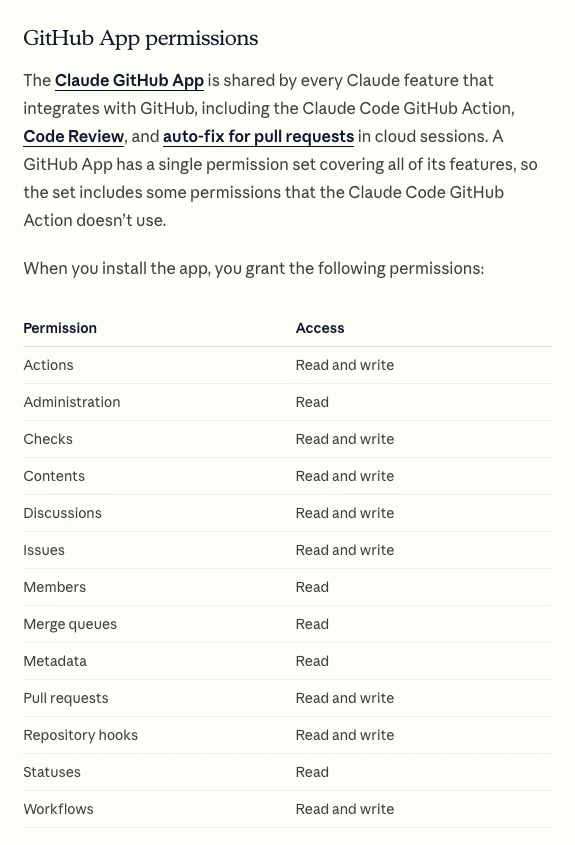
Read that table before you click install. The app asks for 13 permissions at once, including write access to workflows and repository hooks. GitHub doesn't let you accept only some of them. The Action itself uses three, Contents, Issues and Pull requests. If that matters to your team, the docs explain how to build a custom app with only those three. A custom app covers the Action only, not Code Review or auto-fix.
What It Costs to Run
Each run spends two things. GitHub bills the runner time, and Anthropic bills the model use.
| Repo type | GitHub Actions minutes | Claude usage |
|---|---|---|
| Public repo | Free on standard runners | API tokens or your plan |
| Private repo, GitHub Free | 2,000 free minutes a month, then billed | API tokens or your plan |
| Self-hosted runner | Free | API tokens or your plan |
The minute figures come from GitHub's Actions billing page. Minutes are charged to the repo owner, not the person who typed @claude. A failed run still uses the minutes it burned before it failed.
To keep both bills down, the Anthropic docs suggest specific requests, a short CLAUDE.md, and --max-turns in claude_args to cap how long one run can go.
Way 3. Cloud Sessions That Push a Branch
A cloud session runs Claude Code on Anthropic's servers instead of your laptop. The cloud quickstart describes the loop. Claude clones your GitHub repo into a fresh machine, does the task and pushes a branch for you to review.
Start one at claude.ai/code, from the Claude phone app, or with claude --cloud "fix the login bug" in your terminal. The cloud docs list Pro, Max and Team plans, plus some Enterprise seats. Sessions count toward your plan's usage limits, and there's no separate charge for the cloud machine.
Private repos need the app. A browser connection can clone any public repo. For a private one, the Claude GitHub App has to be installed on the account that owns it. If you already use gh, running /web-setup sends your gh token instead, and sessions reach every repo that token can see.
Review, then open the PR. When the diff looks right, press Create PR. The session stays open, so you can paste a CI failure and ask for a fix.
Let it watch the PR. Auto-fix makes Claude respond on its own when a check fails or a reviewer comments. Run /autofix-pr on the branch, or toggle it in the session. It needs the Claude GitHub App.
Bring it home. claude --teleport pulls a cloud session into your terminal, checks out its branch and loads the chat. If you have uncommitted changes, it asks you to stash them first. If you'd rather keep the work on your own machine and just steer from your phone, our Remote Control guide covers that path.
Way 4. The GitHub MCP Server
MCP lets Claude call outside tools directly. With GitHub's server added, you can ask "list my open issues and fix the oldest bug" without Claude shelling out to gh. Our MCP explainer covers the idea behind it.
The MCP docs show the setup. Make a fine-grained personal access token on GitHub, limited to the repos you want Claude to touch. Then add the server.
claude mcp add --transport http github https://api.githubcopilot.com/mcp/ \
  --header "Authorization: Bearer YOUR_GITHUB_PAT"
The command saves whatever you type without testing it. Run /mcp afterward and look for a checkmark beside the server. An ✘ means the token is wrong.
Do you need this if gh already works? Usually not. MCP earns its place when you want issue and PR data inside every prompt, or when gh can't be installed.
How to Undo What Claude Did
Pick the row that matches where the mistake lives right now. The further it has traveled, the more careful the undo.
| Where the mistake is | Use this | What it does |
|---|---|---|
| Claude's edits this session, not committed | /rewind, then Restore code | Puts Claude's tracked edits back |
| A file changed by a script or command | git restore <file> | Resets the file to the last version git saved |
| A commit on your machine, not pushed | git reset --soft HEAD~1 | Removes the commit and keeps the changes |
| A commit already pushed to GitHub | git revert <commit> | Adds a new commit that cancels the old one |
| A commit you "lost" after a reset | git reflog | Shows where your branch pointed before |
| A bad pull request from Claude | Close it | Main never changed |
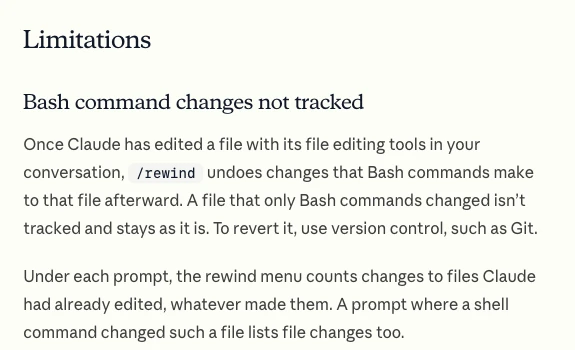
Rewind has real limits. The checkpointing docs say it keeps the 100 most recent checkpoints in a session. Snapshots get swept about 30 days after the session last saved one. Changes made only by Bash commands aren't tracked. Most subagent edits aren't restored either. The docs end the page by saying checkpoints don't replace version control.
Revert once it is pushed. A reset rewrites history that GitHub and everyone else already has. git revert records a new commit that undoes the old one, so nothing breaks for anyone who pulled.
The reflog is your safety net. git reflog lists where each branch pointed before every move. Git keeps those entries for 90 days by default, so a commit that "vanished" after a bad reset is usually still there.
Bad Advice We Keep Seeing
"Clean up your branch with a reset to origin/main." On October 17 one of our own sessions did exactly that on a shared repo. Another session had pushed to main after ours branched off. The soft reset kept our older files, so the squashed commit quietly undid the other session's work, and it went live. We fixed it about 20 minutes later. Now every push starts with git diff --stat origin/main HEAD, and any file we didn't touch means stop.
"Rewind makes git optional." The docs say otherwise, in writing. Rewind is for the next five minutes. Git is for next week.
"Give the Action your GITHUB_TOKEN." Then your CI won't run on Claude's commits. The troubleshooting notes explain why. GitHub doesn't start workflows from commits made with the default token. Leave it out, and the Action signs in as the Claude GitHub App.
"Turn on skip permissions so it can push without asking." Allow git commit and keep pushes behind a prompt or a pull request. A pull request is a free review step. Use it.
Still Wondering?
- Is the Claude Code GitHub Action free?
The Action is free and open source under the MIT license. You still pay for the Claude usage behind it, through API tokens or your Claude plan. On private repos you also use GitHub Actions minutes past your plan's free amount.
- Can Claude Code push to GitHub?
Yes. It runs
git pushlike any other command, after it asks you, unless you saved a rule that allows it. Cloud sessions push their own branch when they reach a stopping point.- Why isn't @claude responding?
Check that the Claude GitHub App is installed on the repo and workflows are turned on. Make sure the secret is saved. Type
@claudeas a whole word, not/claudeor@claude-bot. The person commenting also needs write access.- Does /install-github-app work with GitLab or Bitbucket?
No. It only works with github.com repos and exits on others. GitLab has its own CI/CD setup.
- Can Claude review my pull requests?
Yes, three ways. Run
/code-reviewin a session on any plan, add the review workflow to the Action, or turn on Code Review on a Team or Enterprise plan. Code Review comments inline but never approves or blocks a merge.- How do I remove the GitHub integration?
Delete the
claude.ymlworkflow files, delete the secret, then uninstall the Claude GitHub App if nothing else uses it. Deleting a secret doesn't kill the key itself. Delete an API key in the Claude Console too.If a project has already gone sideways in git, our project rescue page is where we pick those up. For a first session from scratch, start with our Claude Code walkthrough.
Like this guide? Add Vyebe as a preferred source on Google and see more of our posts when you search.
The Paper Trail
- Claude Code docs, GitHub Actions, setup, app permissions, triggers, costs and troubleshooting, accessed October 2026
- Anthropic, claude-code-action on GitHub, features and MIT license, accessed October 2026
- Claude Code docs, Use Claude Code in the cloud, plans, auto-fix and teleport, accessed October 2026
- Claude Code docs, Cloud quickstart, connecting GitHub, /web-setup and Create PR, accessed October 2026
- Claude Code docs, Checkpointing, rewind and its limits, accessed October 2026
- Claude Code docs, Permissions, Bash rules for git commit and git push, accessed October 2026
- Claude Code docs, Worktrees, the --worktree flag, accessed October 2026
- Claude Code docs, Common workflows, pull requests and --from-pr, accessed October 2026
- Claude Code docs, MCP, GitHub's remote MCP server, accessed October 2026
- Claude Code docs, Settings reference, commit attribution, accessed October 2026
- Claude Code docs, Code Review, plans and review options, accessed October 2026
- GitHub Docs, GitHub Actions billing, free minutes by plan, accessed October 2026
- Git documentation, git-revert and git-reflog, the 90 day reflog default, accessed October 2026
Stalled somewhere in here?
Send us the project and what's blocking you. You'll get a straight read on what's actually wrong, including if it's something you can fix yourself.
Tell us what happenedWorth Reading
Steer Claude Code From Your Phone With Remote Control
Claude Code Remote Control lets your phone drive a session running on your own computer. Setup, server mode, push alerts, safety and the errors that block it.
Getting StartedOpenCode vs Claude Code, and What the Free Agent Costs
OpenCode is free and open source, Claude Code is $20 a month and up. Compare models, real costs, safety defaults and the Claude login rule before you switch.